Change orders
How to Price Change Orders So Extra Work Pays Its Way
Extra work in the middle of a job is easy to underprice, because you are already on site and the client is already happy. Here is how to price it so it pays, and how to get the yes in writing.
Updated · 14 min read

The short answer
How to price change orders: count the extra materials, every extra hour at your own pay, your fixed costs per hour and any extra trip, then add the margin you want and divide, do not multiply. In our example, four extra outlets cost $258.00. Priced at materials plus $55.00 an hour they bring $261.00 and keep 1.1%. A 30% margin needs $368.57. Get the client's written yes before you start.
What a change order is, and why it needs its own price
A change order is a written agreement to change the price or the work of a job you have already agreed. The client wants a second outlet in the garage. You open a wall and find rotted wood. A supplier stops making the tile you chose. Each of these changes what you do and what it costs, and each one needs a price and a yes before you go on.
California's contractor board puts it plainly: if the price or the scope of the work needs to change, it "MUST be done with a written 'Change Order'" that is signed by the customer and the contractor before the change, and then becomes part of the contract [1]. Not every state writes the rule the same way, and the rule can depend on the kind of work. The habit is useful everywhere, because a price that is written down cannot be remembered two ways.
This guide is about the price. Writing the change order itself, and getting it signed, is covered in the change orders feature page, and the pages for electricians and general contractors show how a job runs on paper. You can also make one with our free change order generator. Here the question is narrower: what number goes on the line?
- A change order adds work, takes work away, or changes the schedule.
- It has a number, a short description, a price and what it does to the job total.
- It is not approved until the client says yes.
Why extra work gets underpriced
Nobody sets out to do extra work for free. It happens because the moment feels different from writing an estimate. You are standing in the room. The client points at the wall and says "while you are in there". You say "sure, that is not much". An hour later it is a day.
The FTC tells homeowners to make sure a contract includes promises made in conversations and calls about the scope of work and the cost of labor and materials [2]. The New York Attorney General says the same thing from the other side: "any verbal changes to the project must be added to the written contract" [3]. Both are advice to the client, and both describe the problem you have: a verbal yes is not a price.
There are four reasons extra work is usually priced too low.
- You price from the first estimate's feel, not from a count of materials, hours and costs.
- You forget the time around the work: stopping, planning, fetching a part, cleaning up, and starting again.
- You leave out fixed costs. The van, the insurance and the phone do not stop because the job grew.
- You do not want to sound greedy, so you round down in front of the client.
How to price a change order in 6 steps
Use the same costs you use for an estimate. If you do not know your costs per hour yet, work out your overhead per hour first, because step 4 uses it.
-
Write down exactly what is being added or taken away
Describe the change in one or two plain sentences, in the words the client used. "Add four outlets on the garage wall, same circuit panel, same finish as the kitchen." If you cannot say it in two sentences, the change is two changes. Split it.
A photo helps. A photo of the open wall beside the price shows the client what you saw.
Extra electrical work in garage.
Add 4 outlets on the garage wall, run from the existing panel, same finish as the kitchen.
Helps avoid a dispute about what "the extra work" was
-
List the extra materials, including the small parts
Count every material the change needs: boxes, wire, connectors, screws, fittings, sealant. Small parts feel too small to list, and on extra work they add up. If you will make an extra trip to the supplier, that is a cost too (step 5).
Use today's price from your supplier, not the price from the original estimate. Prices may have moved since you wrote it.
-
Count every extra hour at your own pay
Add the hours of the work and the hours around it: stopping the current task, planning the change, protecting the area, cleanup. Multiply by what you want to be paid for an hour, not by what you paid yourself last year.
If someone works for you, use their full cost to you for the hour, including taxes you pay on their wages.
Labor cost = extra hours × your pay per hour
Helps avoid doing the extra work for less than your wage
Never skip counting only the time you are holding the tool
-
Add your fixed costs for those hours
Every working hour carries a share of the costs that keep the business open: the van, insurance, tools, software, the phone. Divide your yearly fixed costs by the hours you really work and bill, and add that amount for each extra hour.
Fixed costs for the change = extra hours × fixed cost per hour
-
Add any trip, setup or schedule cost
If the change needs a separate trip, a permit, a rental or a second visit, add it as its own line. If it pushes other work back by a day, say so on the change order. A change that moves the finish date should show the new date, not only a new price.
Helps avoid a surprise about the schedule at the end of the job
-
Add your margin by dividing, then get the yes
Add up the costs from steps 2 to 5. To keep a margin of 30%, divide the total cost by 0.70. Do not multiply by 1.30: that is a 30% markup, and it keeps less than 30% of the price. The next section shows the difference with real numbers.
Send the change order and wait for your client to approve it before you start the extra work.
Price = total cost ÷ (1 − margin)
For a 30% margin: price = total cost ÷ 0.70
Never skip starting the extra work before the written yes
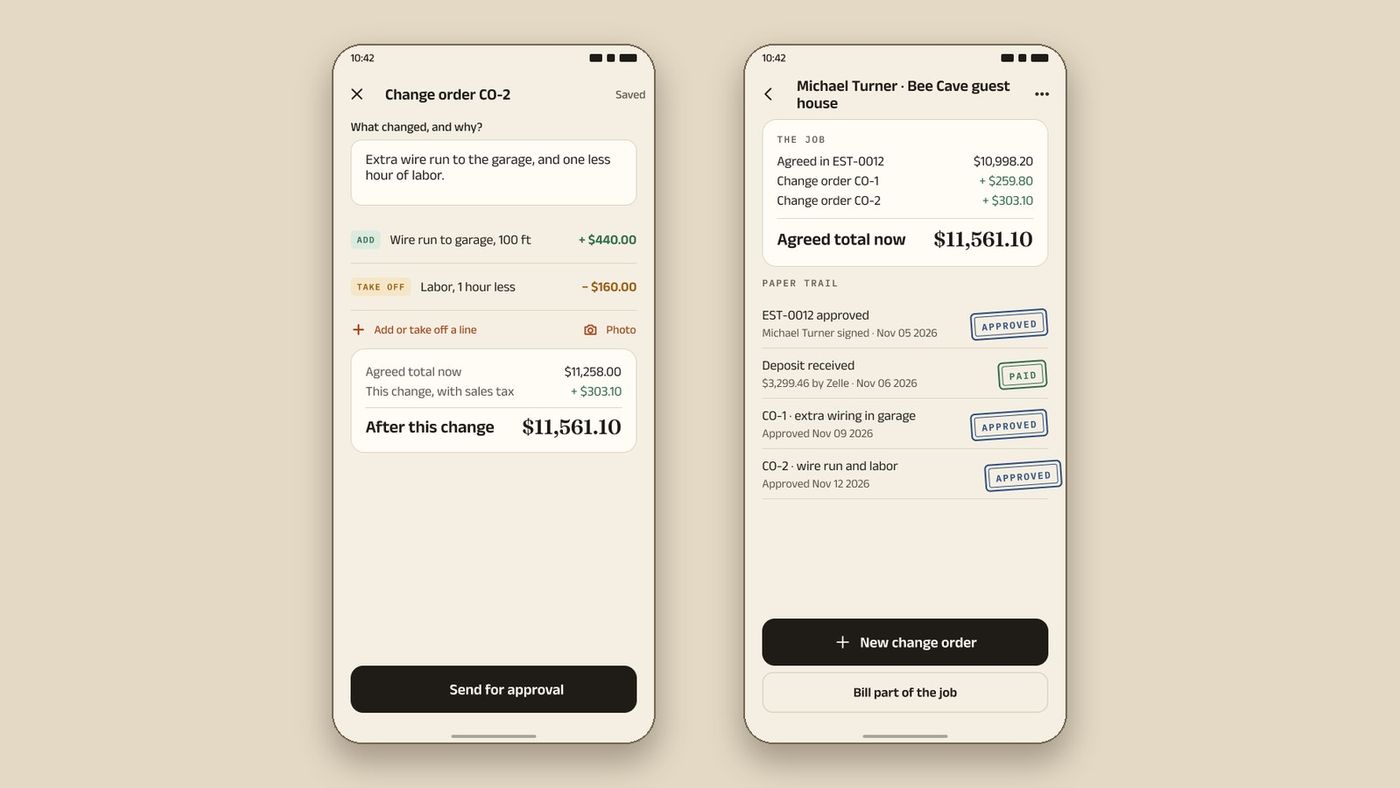
In InvoiceWren, a change order carries its own lines and photos, and a change that is waiting for approval is never counted in the job total.
Worked example 1: adding four garage outlets
An electrician is partway through a kitchen remodel. The client asks for four outlets on the garage wall. US dollars, before tax, with invented numbers.
| Outlets, boxes, wire and connectors | $96.00 |
|---|---|
| Your pay, 3 hours at $40.00 | $120.00 |
| Fixed costs, 3 hours at $14.00 | $42.00 |
| Cost of the extra work | $258.00 |
| Price for a 30% margin (cost ÷ 0.70) | $368.57 |
$96.00 + $120.00 + $42.00 = $258.00. $258.00 ÷ 0.70 = $368.57. Of that price, $110.57 is the margin, which is 30.0% of the price.
Three ways to price the same extra work
Most trades price extra work one of three ways. The cost of the work is the same in each row: $258.00. What differs is how much of the price you keep.
| How it is priced | Price | What you keep | Share of the price |
|---|---|---|---|
| Materials plus $55.00 an hour | $261.00 | $3.00 | 1.1% |
| Cost plus a 30% markup | $335.40 | $77.40 | 23.1% |
| Cost with a 30% margin | $368.57 | $110.57 | 30.0% |
The markup row is the common mistake: a 30% markup on $258.00 is $335.40, which keeps 23.1% of the price, not 30%. The row at $55.00 an hour is the quick way: it looks fair and leaves almost nothing once your fixed costs are counted. For the difference between markup and margin, read margin vs markup.
Should extra work cost more per hour?
Often it should, and it is fair to say so. Extra work breaks the plan for your day. A small change still carries the same trip, the same setup and the same cleanup as a large one, so the hours around a small change are a bigger share of it. If you work in a tight schedule, a one-hour change can cost you a half day.
There are two honest ways to price this. You can count every hour around the change, as in step 3. Or you can set a minimum for a change, for example "changes start at 1 hour of labor", and say so in your estimate terms before the job starts. Either way, the client should see the number as part of the same logic as your estimate, not as a surprise.
What you should not do is hide extra time inside a round price and hope no one asks. A change order has a description, a price and a date. If the client asks why the price is what it is, you should be able to show the four lines from the example above.

Worked example 2: rotted joists found under a deck
A deck rebuild is agreed at $8,400.00. When the old boards come up, six joists are rotted and have to be replaced. This change also moves the finish by two days.
| Agreed price of the job | $8,400.00 |
|---|---|
| Treated lumber for 6 joists | $312.00 |
| Joist hangers and screws | $48.00 |
| Your pay, 7 hours at $40.00 | $280.00 |
| Fixed costs, 7 hours at $14.00 | $98.00 |
| Cost of the change | $738.00 |
| Change order price for a 30% margin | $1,054.29 |
| Job total once the client approves | $9,454.29 |
$312.00 + $48.00 + $280.00 + $98.00 = $738.00. $738.00 ÷ 0.70 = $1,054.29. $8,400.00 + $1,054.29 = $9,454.29. The change order also says: finish date moves two days.
Getting the yes: what the change order should show
A good price still fails if the client can say they did not agree. Keep the change order short and complete.
-
A number and a name
Give each change order a number, for example CO-1, and say which job it belongs to. When there are three, you will not be arguing about "the second one".
-
What changed, in plain words
Use the description from step 1. Say what is added, what is taken away, and what is not included.
-
The price and the new total
Show the price of this change, the job total before it and the job total after it. A client who sees the new total can say yes without doing sums.
Job total after = job total before + this change
-
The schedule, if it moves
Say how many days the change adds, or that the finish date does not move.
-
A date and a signature
The client signs or approves, and the date is recorded. California's board says the change order is signed "prior to the change" [1], so approve first and do the work second. In InvoiceWren the client can approve on their own phone, or you can record a signature in person.
Never skip treating "sounds fine" in a text or a call as approval
Rules to check where you work
Change orders are governed by state law and by your contract, and the rules differ. These examples come from official pages we read on Nov 16 2026. They are not a list of every rule.
California: a home improvement contract and any changes to it must be in writing, and a change to the price or scope must be made with a written change order signed by the customer and the contractor before the change [1]. The board also says that anything promised verbally should be included in writing [1].
New York: the Attorney General's guide for homeowners says that any verbal changes to the project must be added to the written contract, and that the contractor is bound only by what is in the contract [3]. Its fact sheet for homeowners warns that a contractor may try to convince you to have additional work done that you do not want or need, and recommends making a written list of the work [4].
Federal guidance: the FTC advises homeowners to check that a contract includes promises made in conversations or calls about the scope of work and the cost of labor and materials [2].
Where your state or your license board has no rule on change orders, your contract is the rule. Write the change order process into your estimate terms, so the client agrees to it on day one.
This is general information, not legal or tax advice. Ask your state licensing board or a lawyer where you work.
After the yes: invoices, tax and records
Once a change is approved, it is part of the job. Bill it the way you bill the job: on the next progress invoice, or on the final invoice as its own line. A final invoice should start from the agreed price, add each approved change as a line, and take off every payment received, so the client can see how the balance is made. If you bill a job in stages, how to bill a job in stages shows how each invoice adds up.
Whether sales tax applies to a change order depends on your state and on whether the change is labor, materials or both. Apply the same rule you apply to the original work, and ask your state revenue department if you are not sure.
Keep every change order with the job. The IRS lists invoices, receipts and similar papers as supporting documents that show the amounts and sources of your gross receipts [5]. You must keep records that support an item of income or a deduction until the period of limitations for that return runs out [6]. A signed change order shows why an invoice is larger than the estimate, which is the question a client, a lender or an auditor is most likely to ask.
How InvoiceWren handles change orders
Everything below exists in the app today. It keeps the estimate, each change and each payment together on one job.
- A change order with its own lines Add a line, take a line off, attach a photo and see the new job total before you send. The client approves on their own phone.
- Pending changes are never counted A change that is waiting for approval stays out of the job total. When the client says yes, it is added and shows as approved in the job's paper trail.
- Your costs, private to you Add your costs once and the app shows what a job or a change leaves you in job profit. Only you see it. It never appears on the PDF or on the client's page.
- A final invoice that explains itself The final invoice lists the estimate, each approved change and each payment, line by line, so the balance is explained. See invoices.

Checklist before you send a change order
- The change is described in one or two plain sentences, with a photo if it helps.
- Extra materials are listed, including small parts, at today's prices.
- Every extra hour is counted at my pay, including the time around the work.
- Fixed costs for those hours are added.
- Any extra trip, permit or rental is its own line.
- The margin is added by dividing, not by multiplying.
- The new job total and any change to the finish date are shown.
- The client has approved in writing before I start.
Questions
Should a change order cost more per hour than the estimate?
It often should. Extra work breaks your plan for the day, and a small change carries the same trip, setup and cleanup as a large one. Count the hours around the change, or set a minimum change and say so in your estimate terms.
Do I need a signed change order for a small extra?
The safest habit is yes, even for a small one. California requires a written change order for a change to the price or scope of a home improvement contract [1]. Elsewhere the rule varies, but a written yes protects both sides.
Is a text message or a phone call enough?
A text can be a record, but only if it shows the change, the price and a clear yes. The New York Attorney General says verbal changes must be added to the written contract [3]. A change order the client approves on their phone keeps all of it in one place.
What is the difference between markup and margin on a change order?
Markup is added to your cost. Margin is the part of the price you keep. A 30% markup on $258.00 gives $335.40, which keeps 23.1% of the price. To keep 30%, divide the cost by 0.70 to get $368.57.
What if the client says no to the price?
Offer to change the work, not the math. Take something off, such as a finish or a quantity, and re-price it. If the work is needed to finish the job safely, say so in the change order and explain it. Do not do it for less than it costs you.
Do change orders affect the deposit and progress invoices?
They change the job total, so later invoices should reflect them. A deposit already taken stays as it was. Show each approved change as its own line so the balance on the final invoice is easy to explain.
Do I charge sales tax on a change order?
It depends on your state and on whether the change is labor, materials or both. Use the same rule you use for the original work, and ask your state revenue department if you are not sure. This is not tax advice.
How long should I keep change orders?
Keep them with the job and its invoices. The IRS says to keep records that support an item of income or a deduction until the period of limitations for that return runs out [6]. Many service businesses keep them longer than that.
What goes on a change order?
A number, the job it belongs to, what is added or taken away, the price, the job total before and after, any change to the finish date, and a date and a signature or approval. Keep it to one page.
Related pages
Keep reading
 Comparing apps · 8 min readAre There Better Alternatives to Joist and Invoice Simple?Read it →
 Choosing an app · 8 min readWhat is the best estimate and invoice app for contractors? How to choose from your phoneRead it →
 Alternatives · 7 min readWhat are good Housecall Pro alternatives for small business that doesn't need dispatching?Read it →
See what each change leaves you
Add your costs once. Every estimate and change order shows your profit before you send it. Only you see it.
How job profit worksSources
- California Contractors State License Board: What is a Contract?. Checked .
- FTC Consumer Advice: How To Avoid a Home Improvement Scam. Checked .
- New York Attorney General: Hiring a home-improvement contractor. Checked .
- New York Attorney General: Home Improvement Fact Sheet. Checked .
- IRS: What kind of records should I keep. Checked .
- IRS Publication 583: Starting a Business and Keeping Records. Checked .
Prices and features change. We check these pages before each update. If something here is out of date, tell us at hello@invoicewren.com and we will fix it.