Alternatives
What are good Housecall Pro alternatives for small business that doesn't need dispatching?
Housecall Pro alternatives start with one question: do you dispatch anyone?
Updated · 7 min read
The short answer
Housecall Pro alternatives depend on whether you dispatch crews. Its Basic plan lists $79 a month ($59 on the annual price) with scheduling and dispatch. If you mostly send estimates and invoices, a lighter app may do. In our example year with card fees, Housecall Pro Basic came to $2,214.96 and Jobber Core to $1,831.20.
Before you start: what Housecall Pro is built for
Housecall Pro says it is "tailored for teams of 1 to 100+" [1]. Its Basic plan lists estimates and invoicing, online booking, and scheduling and dispatch [1]. If you send crews to several jobs a day, those are the tools you pay for. If you work from your truck and mostly send estimates and invoices, you may be paying for tools you do not use.
This guide helps you check that, then lists the other ways to go. Every price and rule below is from each company's own page, read on Nov 16 2026. We do not say Housecall Pro lacks anything unless its pages say so. Prices change, so open the pages before you decide.
What Housecall Pro lists and charges
US dollars, before sales tax [1]. Basic is shown at $79 a month, or $59 a month on the annual price, and we re-read that in a browser on Nov 16 2026. Essentials is $189 a month, or $149 on the annual price, with 5 users. Max is $329 a month, or $299 annual, with 8 users and $35 a month for each extra user. These are standard rates, before any time-limited offer.
| Plan | Monthly price | Annual price | Users included |
|---|---|---|---|
| Basic | $79 | $59 | 1 |
| Essentials | $189 | $149 | 5 |
| Max | $329 | $299 | 8 |
Housecall Pro pricing page, read Nov 16 2026. Free trial: "14 days free. No credit card required." Extra users on Max: $35 a month each.
What it says about estimates, deposits and reminders
Housecall Pro's help center says you can set a deposit on an estimate as a flat dollar amount or a percentage of the total, up to 100% [3]. E-signatures on estimates are on by default for accounts created on or after Mar 01 2025, and the customer must check a box to agree to do business electronically [4]. Invoice reminders start after the due date, from every day to every 30 days, with 1 to 10 reminders [5].
Its card rates are on a help page: 2.59% in person, 2.99% for an online digital invoice, 3.49% when you type in a card or use one on file, and 1% for a bank payment [2]. We did not find a change order article in its help center.
Do you need dispatching? A five-minute test
Answer with last month's work.
-
Count your crews
How many people go to jobs on their own? If it is you, or you and one helper who follows you, you probably do not dispatch.
-
Count your same-day moves
How often did you reschedule a visit or send someone to a different job the same day? If it is rare, dispatch is not your problem.
-
Look at what you use
Open your app and list the screens you opened this month. If you only used estimates, invoices and payments, you used a small part of it.
Never skip checking the real list, not what you remember
-
Price what you use
Add the yearly plan price and the card fees for a full year. See the example below.
A year of card fees and plan price
Made-up business: $4,200.00 invoiced each month as six $700.00 invoices, all paid by card online. Plan prices and rates are the lowest plans on each company's page [1][2][6][7].
| Housecall Pro online card fee at 2.99% in a month | $125.58 |
|---|---|
| Housecall Pro card fees, 12 months | $1,506.96 |
| Housecall Pro Basic at $79 a month, 12 months | $948.00 |
| Housecall Pro Basic at $59 a month, 12 months | $708.00 |
| Year: Housecall Pro Basic, $79 a month, with card fees | $2,454.96 |
| Year: Housecall Pro Basic, $59 a month, with card fees | $2,214.96 |
| Year: Jobber Core, $29 a month billed annually, with card fees (2.9% + 30¢) | $1,831.20 |
| Year: Joist Pro, $17 a month, with card fees (top rate 3.49% + 49¢) | $1,998.24 |
Card fees are the biggest number in every row. Joist says "up to" 3.49%, so its fee may be lower. This does not count what each plan includes, such as dispatching.
Four ways to go
Pick the one that matches the test above.
| Route | Good if | What you give up |
|---|---|---|
| Stay and switch to annual prices | You use scheduling and dispatch | You commit to a year |
| A field service app with fewer tools, such as Jobber Core | You want scheduling but fewer plan features [6] | Reminders need the next plan up [6] |
| A contractor invoicing app, such as Joist | You send estimates and invoices [7] | Change orders are on its highest listed plan only |
| InvoiceWren | You mostly send estimates, changes and invoices [8] | No scheduling, no dispatch, no card processing |
How to move without losing a week
Keep your old account open until every open estimate and unpaid invoice is closed. Export your client list. Tell clients where to pay before the first invoice goes out from the new app. You can import your clients and items from a CSV or Excel file: the file is read on your device, every row is checked before anything is saved, and you can undo the import.
Start every new job in the new app, and finish the jobs already in progress in the old one. Two weeks of both is cheaper than one lost invoice.
Rules by place: the United States
Prices on this page are in US dollars and before sales tax; Housecall Pro says its prices are "exclusive of sales tax" [1]. Sales tax on your own work depends on your state; ask your state revenue department. This is not tax advice.
If you do not need dispatching, here is the InvoiceWren side
InvoiceWren is built for the estimate-to-invoice path [8].
- Free Free covers 5 invoices and 5 estimates a month, estimates your client signs, deposits and final invoices. See pricing.
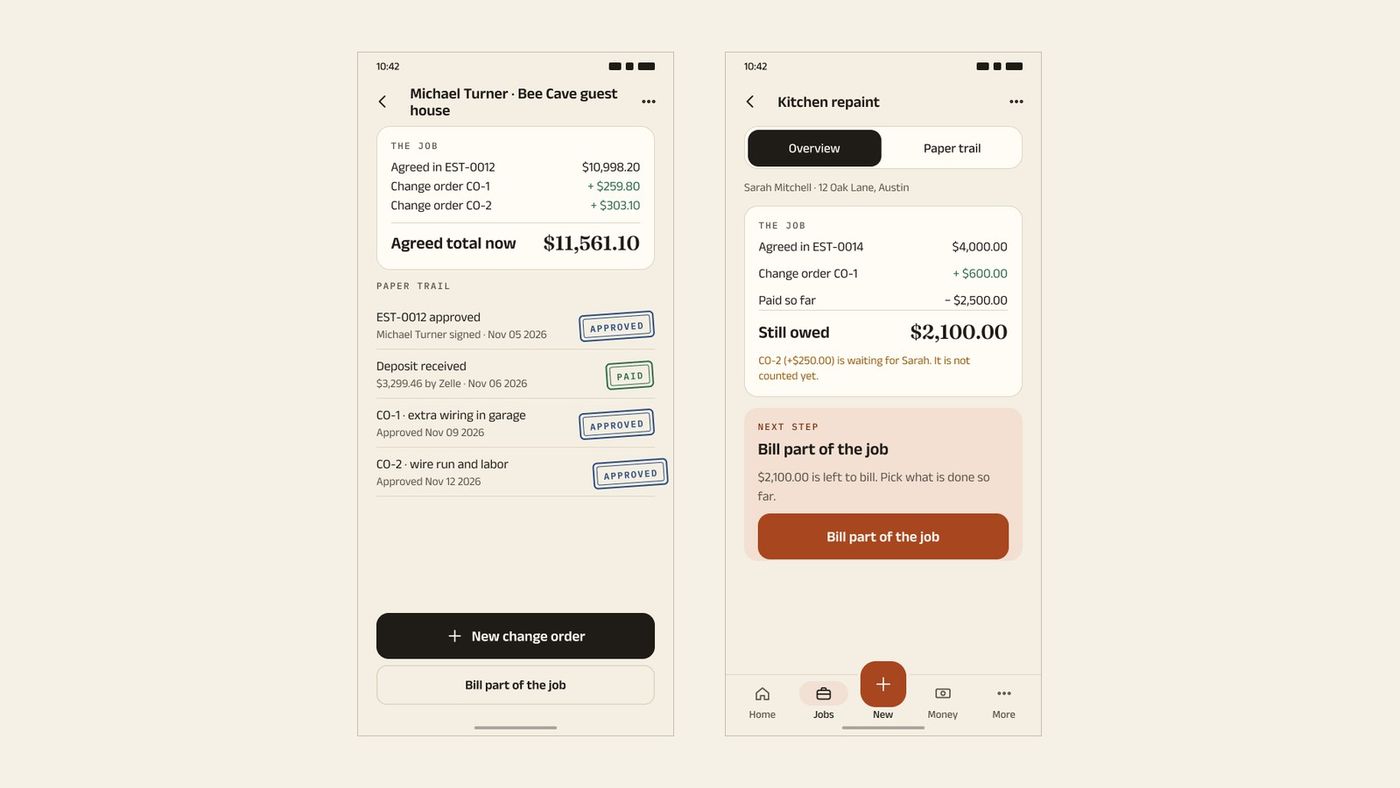
- Change orders and jobs A client approves a change order, and the job shows what was agreed, what changed and what is still owed.
- Pro Pro is $12.97 a month or $127 a year, with reminders emailed for you. It does not do dispatching.
Before you switch
- I answered the dispatch test with last month's work.
- I priced the full year with card fees.
- I exported my clients.
- I know where to pay on my new invoices.
- I kept the old account until every open invoice was paid.
- I read each pricing page again today.
Questions
What is a good alternative to Housecall Pro for a small business?
It depends on what you use. If you dispatch crews, look at other field service apps. If you mostly send estimates and invoices, a contractor invoicing app like Joist or InvoiceWren may be enough [7][8]. Run the dispatch test first.
How much does Housecall Pro cost?
Its pricing page lists Basic at $79 a month ($59 on the annual price), Essentials at $189 ($149) and Max at $329 ($299) [1]. These are the standard rates before any limited-time offer, checked on Nov 16 2026. Prices are before sales tax.
Is there a free Housecall Pro?
There is a trial: "14 days free. No credit card required." [1]. We did not find a plan that stays free.
What does Housecall Pro charge for card payments?
Its help page lists 2.99% for an online digital invoice, 2.59% in person, 3.49% for a typed or saved card and 1% for a bank payment [2]. Tap to Pay is an extra $5 per active device per month.
Does Housecall Pro have change orders?
We did not find a change order article in its help center on Nov 16 2026. It has multi-option estimates, which is a different thing. If you need change orders, ask Housecall Pro.
Can Housecall Pro take deposits?
Yes. Its help center says a deposit can be a flat amount or a percentage of the estimate, up to 100% [3].
Does Housecall Pro send automatic reminders?
Its help center describes invoice reminders that start after the due date, with 1 to 10 reminders at set gaps [5]. Check the plan screen to see which plan has them.
Is Housecall Pro worth it without dispatching?
It can be if you use the other tools. If you only use estimates, invoices and payments, compare the full year with card fees, like the example above, against a simpler app.
Is there an alternative with no fee on client payments?
InvoiceWren takes no fee on your client payments, because they go to your own account [8]. The account you use may have its own fees. See our guide to Jobber alternatives with no processing fees.
Related pages
Keep reading
 Comparing apps · 8 min readAre There Better Alternatives to Joist and Invoice Simple?Read it →
 Choosing an app · 8 min readWhat is the best estimate and invoice app for contractors? How to choose from your phoneRead it →
 Getting paid · 9 min readHow to Accept Payments Without Fees: 5 Ways for Service BusinessesRead it →
Run the job without the dispatch bill
Send an estimate, take a deposit, add a change and send the final invoice.
Get started freeSources
- Housecall Pro pricing page. Checked .
- Housecall Pro help: payment processing options. Checked .
- Housecall Pro help: collect deposits on estimates. Checked .
- Housecall Pro help: e-signatures on estimates. Checked .
- Housecall Pro help: invoice reminders. Checked .
- Jobber pricing page. Checked .
- Joist pricing page. Checked .
- InvoiceWren pricing. Checked .
Prices and features change. We check these pages before each update. If something here is out of date, tell us at hello@invoicewren.com and we will fix it.