Choosing an app
What is the best estimate and invoice app for contractors? How to choose from your phone
The best estimate and invoice app for contractors is the one that still explains the balance after the job changes.
Updated · 8 min read
The short answer
The best estimate and invoice app for contractors depends on how you work, so test before you pay. Check seven things: estimate to invoice in one step, a change after approval, a client signature on a phone, card fees, weak signal, a balance you can explain in one sentence, and export. Prices and rules here are from each company's own page, read Nov 16 2026.
Before you start: "best" depends on how you work
We could not find one answer that is best for every contractor, and nobody should tell you there is one. The top results we looked at on Nov 16 2026 were ranked lists written by companies that put their own app first. So this guide gives you a way to decide, with facts from each company's own pages, and an honest place for InvoiceWren in the list.
A phone changes the test. You write the estimate in a driveway, with one hand and bad signal. The app has to be quick, show the client the right thing and keep the money straight afterwards.
What the apps list, side by side
US dollars, from each company's own page, read Nov 16 2026. "Not shown" means the page we could read did not say.
| App | Lowest listed price | Trial or free plan | Change orders |
|---|---|---|---|
| Invoice Simple | $6.99 a month, up to 3 invoices (App Store and its pricing page) [3] | 14-day trial (help page) | Not found |
| Joist | Basics: up to 5 documents a month [2] | 14-day trial, no card; no free plan [2] | Elite only, invoices only |
| Jobber | Core: $29 to $49 a month, 1 user [1] | 14-day trial, no card [1] | Not found |
| Housecall Pro | Basic: $59 to $79 a month [4] | 14-day trial, no card [4] | Not found |
| Square | Square Free: no monthly cost; 3.3% + 30¢ per invoice card payment [5] | No monthly cost on Square Free [5] | Not found |
| InvoiceWren | Free: 5 invoices and 5 estimates a month; Pro $12.97 a month [8] | Free plan | Pro, and the first job on Free |
Joist figures: monthly prices, with a lower price on annual billing for Basics and Elite. Jobber and Housecall Pro show a price per commitment. See each company's page. "Not found" means we did not find it on the pages we could read, not that the app lacks it.
What the top results skip
We read six ranked lists for this search. They cover price, templates, payments and QuickBooks. As far as the headings and criteria we could read, none of them covers what happens after the client says yes: a change to the price, which changes are approved and which are still waiting, and how the balance is explained line by line.
That gap is where contractors lose money. A change is agreed on site, written in a text, and forgotten at the final invoice. So below we add the criteria that lists leave out.

Seven questions that decide it
Ask them of any app, including ours.
-
Can I turn an approved estimate into an invoice without retyping?
The estimate should become the invoice, with the deposit already taken off.
-
What happens when the client asks for one more thing?
Look for a written change that the client approves, kept next to the first price. A text message is not a record.
Never skip testing a change after the yes
-
Can the client sign on their own phone?
Send the estimate to your own phone and sign it. If it takes more than one screen, your client will not do it.
-
Who pays the card fee, and how much is it?
Fees come out of the payment. Find the percentage and the fixed amount on the company's page [5]. See our Square fee guide.
-
Does it work with a weak signal?
Write a document with your phone in airplane mode, then reconnect. Check that nothing is lost.
-
Can I explain the balance in one sentence?
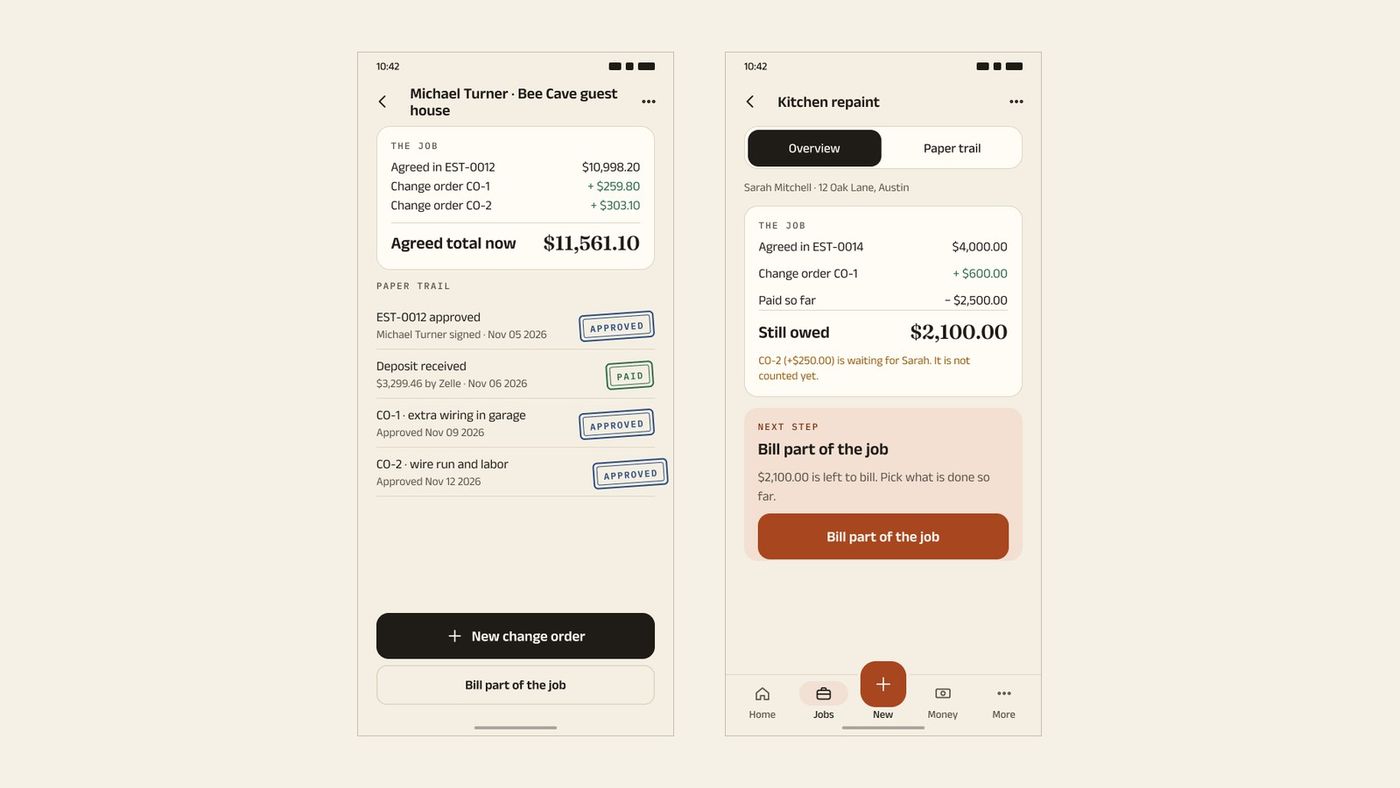
Open a job with a deposit and a change. You should be able to say what was agreed, what changed and what is still owed.
-
Can I export my records?
The IRS says you may choose any recordkeeping system that "clearly shows your income and expenses" [6]. Make sure you can get your data out.
A job that changes, and the balance that should come out
Made-up job. The numbers show what a clear balance looks like. Every figure was added up by a script.
| Approved estimate | $2,400.00 |
|---|---|
| Deposit paid (30%) | $720.00 |
| Change order approved by the client | $600.00 |
| New agreed total | $3,000.00 |
| Progress payment received | $1,000.00 |
| Balance still owed | $1,280.00 |
| A second change, still waiting for the client (not counted) | $300.00 |
| The wrong balance if you count the waiting change | $1,580.00 |
The right balance is $1,280.00. If the waiting change is counted as approved, the balance reads $1,580.00, which is $300.00 you have not agreed on yet.
What to use at each stage of a job
Before the job, you need a fast estimate that the client signs. During the job, you need changes that are approved and a deposit you can show. After the job, you need an invoice that shows the paid amounts and what is left. Most apps do the first and last. The middle is what separates them.
If your work rarely changes, a simple app with a low limit is fine. If it changes often, test that part before anything else.
Rules by place: the United States
Prices are in US dollars. Sales tax on your work and on your estimates depends on your state; ask your state revenue department. The FTC says to "double-check the recipient's information to make sure you're sending money to the right person" [7]. This is not tax advice.
Where InvoiceWren fits
InvoiceWren is built for the whole path, from the first estimate to the final payment [8].
- Estimate to invoice Your client signs the estimate on their phone, and the same job later holds the deposit, changes and the final invoice.
- Change orders A client approves a change order. Pending changes are never counted as approved, and a payment is never counted twice.
- A plan you can start free Free covers 5 invoices and 5 estimates a month. Pro is $12.97 a month or $127 a year. InvoiceWren does not process cards, so there is no card fee from us.
Before you pick an app
- I tested a change after the client said yes.
- I signed an estimate on a phone, as my client would.
- I found the card fee on the company's page.
- I tried it with no signal.
- I opened a job and explained the balance in one sentence.
- I checked that I can export my records.
Questions
What is the best estimate and invoice app for contractors?
It depends on how you work. If you run crews and schedules, look at a field service app. If you mostly send estimates, changes and invoices, a lighter app may fit. Use the seven questions above on any app.
Which estimate and invoice app has a free plan?
InvoiceWren Free covers 5 invoices and 5 estimates a month [8]. Square Free has no monthly cost and charges processing fees on payments [5]. The others we read have trials: 14 days for Joist, Jobber and Housecall Pro [1][2][4].
Can I send an estimate from my phone and have the client sign it?
Yes, in several apps. Jobber lets a client draw or type their name [9]. Test it on your own phone first. In InvoiceWren, the client signs the estimate on their phone.
How do I turn an estimate into an invoice?
In a good app you do it with one tap, and the deposit already paid is taken off. If you have to type the lines again, the app is costing you time.
What happens if the client changes the job after approving the estimate?
You need a change order: a written change that the client approves, kept next to the first price. Joist has change orders on Elite for invoices [2]. InvoiceWren has them on Pro and on your first job on Free [8].
Which app charges the lowest card fees?
Fees differ by plan and payment type, and they change. Square lists 3.3% + 30¢ for an invoice card payment on Square Free [5]. Compare the full year, not one rate. Read our fee guide.
Do I need QuickBooks with an estimate and invoice app?
Not always. The IRS says you may use any recordkeeping system that clearly shows your income and expenses [6]. Pick the app that keeps clear records and lets you export them.
Is there an estimate and invoice app with no fee on my payments?
InvoiceWren takes no fee on your client payments, because they go to your own account [8]. Your account may charge its own fees. See how to accept payments without fees.
Is an app better than a spreadsheet for a small contractor?
A spreadsheet works for a few documents a year. Once you send documents weekly, an app saves time and keeps a record your client can see.
Related pages
Keep reading
 Comparing apps · 8 min readAre There Better Alternatives to Joist and Invoice Simple?Read it →
 Alternatives · 7 min readWhat are good Housecall Pro alternatives for small business that doesn't need dispatching?Read it →
 Getting paid · 9 min readHow to Accept Payments Without Fees: 5 Ways for Service BusinessesRead it →
Try a job from estimate to final payment
Send an estimate, take a deposit, add a change and watch the balance stay explained.
Get started freeSources
- Jobber pricing page. Checked .
- Joist pricing page. Checked .
- Invoice Simple on the App Store. Checked .
- Housecall Pro pricing page. Checked .
- Square help: What are Square's fees?. Checked .
- IRS: Recordkeeping. Checked .
- FTC: Mobile Payment Apps: How To Avoid a Scam When You Use One. Checked .
- InvoiceWren pricing. Checked .
- Jobber help: Quote approvals. Checked .
Prices and features change. We check these pages before each update. If something here is out of date, tell us at hello@invoicewren.com and we will fix it.