Comparing apps
Invoice Simple Alternative With a Better-Looking App? How to Judge
If you want an Invoice Simple alternative because the app or the documents feel plain to you, this guide helps you test any invoicing app by how it looks to your client.
Updated · 8 min read
The short answer
An Invoice Simple alternative with a better-looking app is a matter of taste, so test it. Invoice Simple lists more than 60 templates, your logo and photos, and premium templates on its top plan. [1][2] InvoiceWren has one document design for everyone, built to be easy to read, with your logo first. Judge any app on the six checks below, using your own job.
What Invoice Simple says about its look
Invoice Simple's features page says you can choose from more than 60 pre-built templates and customize them with your logo and photos. [2] Its pricing page lists photos on the Plus plan and premium templates on the Premium plan. [1]
That is a lot of choice. If you like to pick a style for each client, a big template library is a real strength. We do not say its design is bad, and we will not show you a picture of it. Look at it yourself, in your own account, with your own job.
Facts are from Invoice Simple's own pages, read in a browser on Nov 14 2026.
What a client notices in the first five seconds
Your client does not compare templates. They open one document and ask three things: who is this from, what is it for, and what do I owe or what do I agree to? Looks matter only as far as they answer those questions fast.
That is why the look test below starts with a phone, the total and the top of the page. A document with a plain layout that answers all three is better than a handsome one that hides the balance.
A six-point look test for any invoicing app
Do this with one real job in each app. It takes about ten minutes and it shows more than any screenshot.
-
Open the document on a phone
Most clients read your estimate on a phone. Send it to your own phone and open it. Check that nothing is cut off and the total is easy to find.
Helps avoid a document that only looks good on a computer
-
Check the top of the page
Does your logo or name come first? Can the client see who sent it, the date, the number and the due date without hunting?
Never skip your business name where the client looks first
-
Read the totals as your client would
Find the subtotal, tax, deposit paid and balance due. Each should be on its own line, in plain words. If you cannot tell what is owed in five seconds, your client cannot either.
Helps avoid calls from clients asking "what do I owe?"
-
Add a photo and a long item name
Add a photo to a line and type a long description. See if the layout still holds together. A good layout survives real work, not only a demo.
-
Look at the status marks
Mark one document approved, then paid. Does the mark sit in blank space, or does it cover words and numbers?
Never skip a stamp that never covers a number
-
Print it or save it as a PDF
Some clients print. Save the PDF and look at page breaks, fonts and your logo. A document that is easy to read on paper is usually easy to read anywhere.
A test job to use in every app
Use the same job in each app so the documents are comparable. A made-up bathroom job in US dollars, with 8.25% sales tax on everything and a 30% deposit.
| Tile and materials | $1,240.00 |
|---|---|
| Labor, 14 hours at $65.00 | $910.00 |
| Fixtures | $320.00 |
| Subtotal | $2,470.00 |
| Sales tax, 8.25% | $203.78 |
| Total | $2,673.78 |
| Deposit, 30% | $802.13 |
| Balance after the deposit | $1,871.65 |
$1,240.00 + $910.00 + $320.00 = $2,470.00. $2,470.00 × 0.0825 = $203.78. $2,470.00 + $203.78 = $2,673.78. $2,673.78 × 0.30 = $802.13. $2,673.78 − $802.13 = $1,871.65. Sales tax rules differ by state; this is only a test job.
How InvoiceWren approaches the look
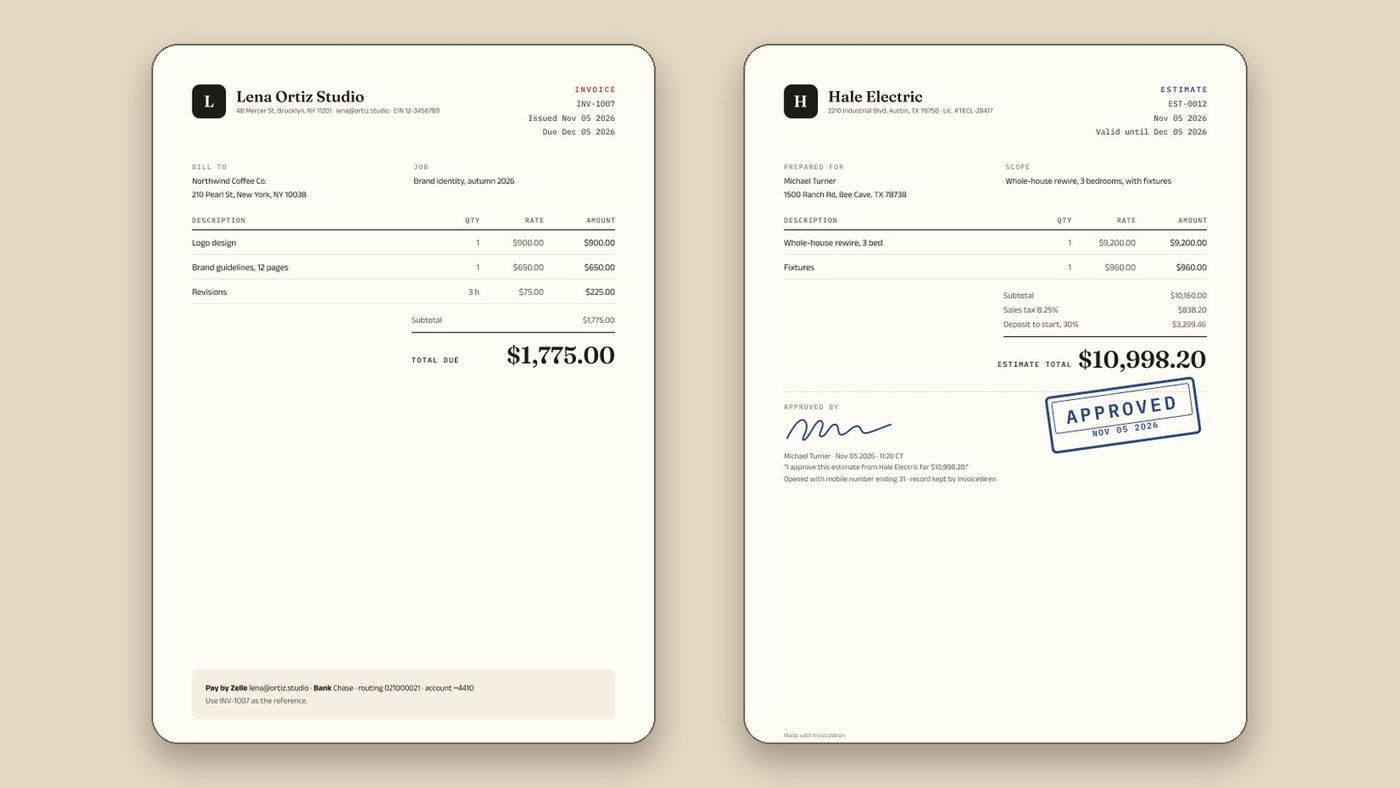
InvoiceWren gives every user one document design, not a library. Your logo and name lead, the amounts line up in columns, and each total has its own line. We chose one design so every estimate, change order, invoice and receipt looks like it belongs to the same job.
Photos sit beside the line they explain, up to 3 on a line, and they appear in the preview, the PDF and the page your client opens. A status mark such as Approved or Paid is placed in blank space and never covers text or numbers.
That is a trade. If you want to pick from dozens of styles, Invoice Simple offers more choice than we do. If you want one clear design that you do not have to think about, that is what InvoiceWren is for.
When many templates are the right choice
A big template library fits some businesses. If you send documents to clients who judge you by your brand, such as a design studio or a photographer, a style that matches your look can be worth a monthly fee. Invoice Simple's pages list more than 60 templates and premium templates on its top plan [1][2].
It fits less well when your work is a job, with an estimate, changes and a balance. There, a client cares that the figures are easy to follow. If that is you, one clear design is less to maintain, and it looks the same on every estimate, change order, invoice and receipt. See estimates your client signs, InvoiceWren's pricing and our comparison of Joist and Invoice Simple.
Looks and layout, side by side
| Feature | Invoice Simple | InvoiceWren |
|---|---|---|
| Templates | More than 60 [2] | One design for every user |
| Your logo | Yes [2] | Yes; it comes first, or your first letter on an ink tile |
| Photos on documents | Plus plan and up [1] | Every plan, up to 3 on a line |
| Premium templates | Premium plan [1] | Not applicable: one design |
| Client sees it on a phone | Mobile app and email, text or link [2] | A page that opens from the email, no account |
Invoice Simple facts: pages read Nov 14 2026. InvoiceWren facts: how the app works today.
Where InvoiceWren spends its effort
Looks matter most when they help a client understand and agree. These are in the app today.
- A balance explained line by line The estimate, each approved change, the deposit and each payment are shown on the invoice, so the balance never needs explaining on the phone.
- Estimates that look signed When your client signs, the document shows the signature and an Approved mark in blank space.
- Photos beside the work A cracked tile or a finished wall sits next to its price. Clients see what they are paying for.
- No "Made with InvoiceWren" line on Pro On Pro you can turn off our small footer line, so the document is yours.
Before you change apps because of looks
- I opened a real document on a phone, not only a computer
- I checked the totals for balance due in five seconds
- I tested a photo and a long description
- I looked at the printed or PDF version
- I know whether I need many templates or one clear one
Questions
Is there an Invoice Simple alternative with better-looking invoices?
"Better" is personal, so test with your own job. Invoice Simple offers more than 60 templates. [2] InvoiceWren has one design that puts your logo and a clear balance first.
How many templates does Invoice Simple have?
Its features page says more than 60 pre-built templates. [2] Its pricing page lists premium templates on the Premium plan. [1]
Can I add my logo and photos in InvoiceWren?
Yes. Your logo leads the document, and you can add photos to a line. On a free plan the document carries a small "Made with InvoiceWren" line, which Pro turns off.
Does InvoiceWren have many templates?
No. It has one design for every user, on purpose. If you want many styles, Invoice Simple offers more choice. [2]
Is InvoiceWren cheaper than Invoice Simple?
For unlimited invoices, InvoiceWren Pro is $12.97 a month and Invoice Simple Premium is $21.99. [1] InvoiceWren also has a free plan with 5 invoices and 5 estimates a month. [3]
Does the look of an invoice affect whether clients pay?
We did not find evidence either way, so we do not claim it. What helps clients pay is clarity: who it is from, what it is for, what is owed and how to pay.
Can I change the colors in InvoiceWren?
The design is the same for everyone so every document looks like it belongs to the job. You can add your logo, and on Pro turn off our small footer line.
Does InvoiceWren work on a phone?
The web app works in any browser on a phone today. The iPhone and Android apps are being tested now and will be available before the end of 2026. The page your client opens from an email works on any phone.
Related pages
Keep reading
See your own job in a clean document
Start free, add your logo and send an estimate to your own phone.
Get started freeSources
- Invoice Simple pricing plans. Checked .
- Invoice Simple features. Checked .
- InvoiceWren pricing. Checked .
Prices and features change. We check these pages before each update. If something here is out of date, tell us at hello@invoicewren.com and we will fix it.