Comparing apps
Is Joist Free to Use? What the Joist App Costs in 2026
This guide is about the Joist app, the invoicing and estimating app for contractors, not a joist in a building.
Updated · 7 min read

The short answer
Is Joist free to use? Not any more. Joist's pricing page says its free plan is no longer available, and offers a 14-day free trial with no credit card instead. [1] The Joist app is still free to download, but a plan is needed after the trial. [1] Pro is listed at $17 a month and Elite at $32 a month. [1]
What Joist says about its free plan
The Joist pricing page says: its free plan is no longer available, but all users can try Joist with a 14-day free trial. [1] The page adds that no credit card is needed. [1] The trial gives full access to Joist's top plan, called Run, for 14 days. [1]
We did not find a notice that says when the free plan ended or why. Only the line on the pricing page. If you used an old free Joist account, check what your own account now allows before you rely on it.
This page was read on Nov 14 2026. Prices and plans can change, so check Joist's page before you buy.

A free trial, a free plan and a limited free plan are three different things
The words sound alike, so be sure which one a company means.
| What it is | Does it end? | What to ask |
|---|---|---|
| Free trial | Yes, after a fixed time. Joist lists 14 days. [1] | What happens on day 15, and what happens to my data? |
| Free plan | No, but it has limits | What are the limits, and what is behind a paid plan? |
| Free app download | No, but the plan is separate | Is a paid plan needed to send documents? |
Joist's page says the app is free to download and that a plan is needed after the trial. [1]
Joist plans and what each one lists
| Plan | Price shown on the page | What the page lists |
|---|---|---|
| Basics | $8.34 to $12 a month (the page shows $12, $10 and $8.34) | Up to 5 documents a month, online payments, estimates to invoices |
| Pro | $17 a month, or $14.17 on annual billing | Unlimited documents and clients, your logo, line items and document photos, work orders |
| Elite | $32 a month, or $26.67 on annual billing | Everything in Pro, plus change orders, license and insurance, business reports |
| Run | $100 a month, or less with annual billing | Everything in Elite, plus job organization and visit scheduling |
Source: Joist's pricing page, read Nov 14 2026. [1] The page shows several prices on each card and does not label every one, so confirm the price at checkout.
The part people miss: card fees
A plan price is only part of what you pay. When your client pays through Joist, Joist's support page lists a card fee of up to 3.49% plus 49 cents for each payment in the United States. [2] Bank (ACH) payments are 1%, with a cap of $15. [2] The fee is taken out of what you receive. [2]
Joist also lists a 1.5% fee for an Instant Payout, which puts the money in your account within 30 minutes. [3] Standard payouts to a card are free on that page. [3]
What a $1,000 and a $2,000 job cost in fees
A made-up job paid through Joist, using the fees on Joist's support page. [2]
| $1,000.00 paid by card: 3.49% = $34.90, plus $0.49 | $35.39 |
|---|---|
| $1,000.00 paid by bank (ACH): 1% | $10.00 |
| $2,000.00 paid by bank (ACH): 1% would be $20.00, capped at | $15.00 |
| You keep on the $1,000.00 card payment | $964.61 |
$1,000.00 × 0.0349 = $34.90; $34.90 + $0.49 = $35.39; $1,000.00 − $35.39 = $964.61. Joist says the fee is up to 3.49%, so your rate may be lower.
If you want to pay nothing for the app
You have three honest choices. Use the 14-day Joist trial and decide after. Pay for Basics or Pro. Or use an app that still has a free plan.
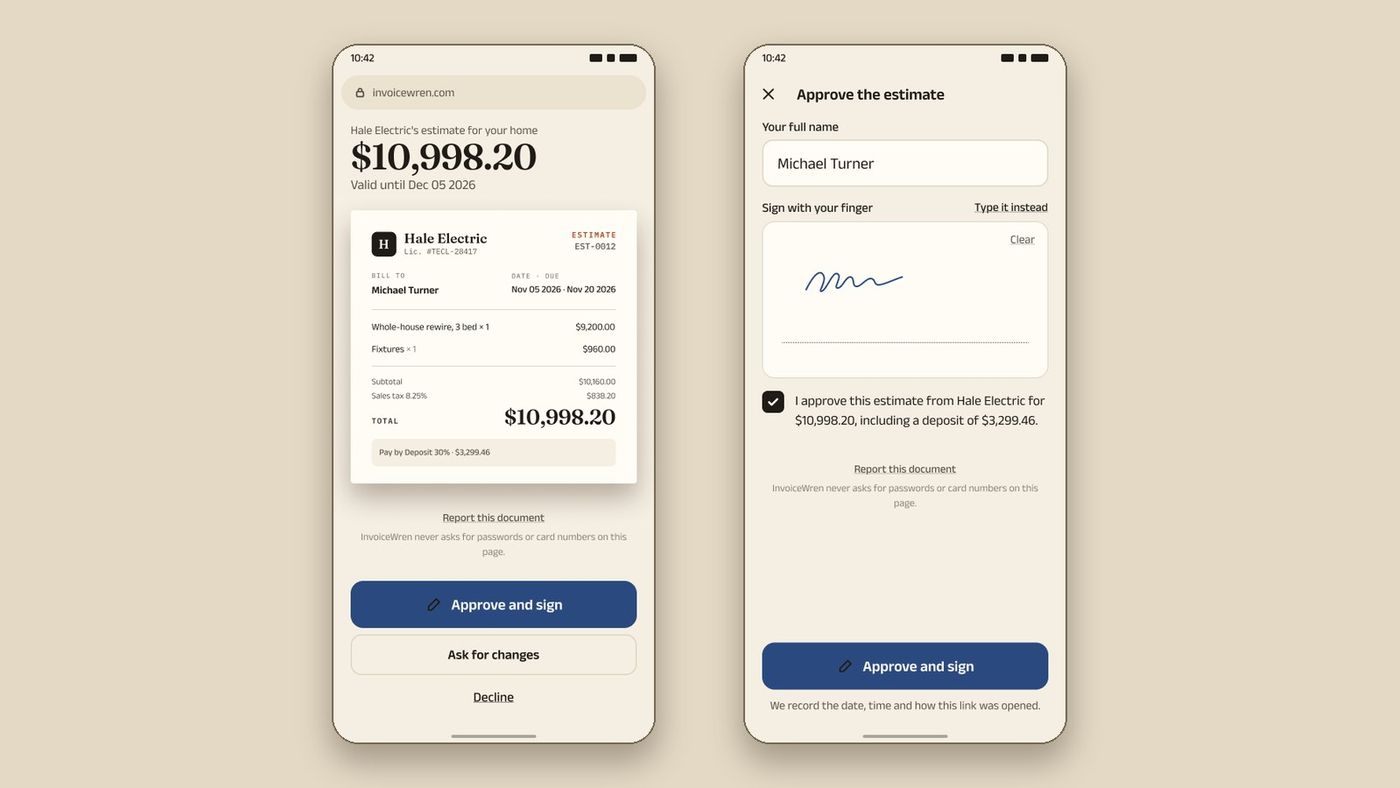
InvoiceWren has a free plan that is not a trial. It sends 5 invoices and 5 estimates a month, and every estimate can be signed by your client. [4] Your first job has every Pro feature. [4] Pro costs $12.97 a month or $127 a year. [4]
InvoiceWren never takes a fee on payments. Your client pays you directly by Zelle, bank transfer or your own payment link. [4] If you add your own Stripe link, Stripe's card fee still applies, so a card payment is never free of cost. A bank transfer or Zelle payment can be. See change orders, getting paid and pricing, and read what to do if you used the Joist free plan.
Where Joist is the better pick
Be fair to Joist. It has payments built in, and its page lists change orders on Elite. [1][5] If you want card payments inside the app and you are happy to pay the fee, Joist does that. InvoiceWren does not process card payments itself.
Joist's change orders are for invoices, not estimates, and editing a signed change order removes the client's signature. [5] In InvoiceWren, a change order is sent to your client for approval before you do the work, on every job.
How to move your clients and open jobs
If you decide to leave, do it in this order so no client is confused.
-
Export what you can
Download your client list and any documents you may need later. Keep a PDF of every open estimate and every unpaid invoice.
-
Finish what is open
Do not move a job halfway. Finish the open ones where they are, and start new jobs in the new app.
-
Import clients and items
You can import your clients and items from a CSV or Excel file: the file is read on your device, every row is checked before anything is saved, and you can undo the import.
-
Tell clients where to pay
The first invoice from a new app is the moment a client may pay the wrong person or in the wrong place. Put the payment details at the top and say they have changed.
Never skip changing where clients pay without telling them
Before you pay for any invoicing app
- I know how many documents I send in a busy month
- I checked whether change orders are in the plan I can afford
- I added the card fee to the plan price
- I tested the app with a real job before the trial ended
- I know how to export my clients if I leave
- I exported my clients and kept a PDF of every open estimate
Questions
Is the Joist app free?
The app is free to download, but its pricing page says the free plan is no longer available. [1] You get a 14-day free trial, then you need a paid plan. [1]
How much is Joist per month?
Joist lists Pro at $17 a month and Elite at $32 a month, with lower prices on annual billing. [1] Basics shows prices from $8.34 to $12 a month on the page. [1]
Does Joist have a free trial?
Yes. The page offers a 14-day free trial with no credit card needed. [1]
Does Joist charge fees on payments?
Yes. Joist's support page lists up to 3.49% plus 49 cents on a card payment and 1% on a bank payment, capped at $15. [2]
Which Joist plan has change orders?
Elite. Joist's page and support article both list change orders under Elite. [1][5]
Is there a free alternative to Joist?
InvoiceWren has a free plan with 5 invoices and 5 estimates a month. [4] It is a different kind of app, so read what it does before you switch. Our guide to Joist alternatives now that the free plan is gone goes further.
What happens to my data if the trial ends and I do not pay?
We did not find Joist's answer on the pages we read, so we do not guess. Ask Joist before the trial ends, and export your clients and documents first.
Is there a way to use Joist for free after the trial?
The pricing page we read on Nov 14 2026 says the free plan is no longer available. A paid plan is needed after the trial.
Related pages
Keep reading


Want a free plan that stays free?
InvoiceWren's free plan sends 5 invoices and 5 estimates a month, and your first job has every Pro feature.
Get started freeSources
- Joist pricing page. Checked .
- Joist support: transaction fee for Joist Payments. Checked .
- Joist support: Instant Payouts with Stripe. Checked .
- InvoiceWren pricing. Checked .
- Joist support: Change Orders. Checked .
Prices and features change. We check these pages before each update. If something here is out of date, tell us at hello@invoicewren.com and we will fix it.