Free, exactly
Is Invoice Simple free? What you get without paying
Is Invoice Simple free? The download is, and there is a trial. A plan that stays free is not something we found.
Updated · 8 min read

The short answer
Is Invoice Simple free? The app is free to download, and its help center describes a 14-day trial with no subscription. After that, the lowest paid plan, Essentials, is $6.99 a month on the US App Store and lists up to 3 invoices a month. We did not find a plan that stays free after the trial.
Before you start: what "free" can mean
People mean three different things when they ask if an app is free. The app costs nothing to download. You can try it with no payment for a time. Or you can use it for good with no payment. Invoice Simple is the first, and we could confirm the second. We did not find the third.
This guide says exactly what we read, with dates, so you are never charged by surprise. Everything below comes from the App Store listing, Invoice Simple's pricing page and its help pages, read on Nov 16 2026 [1][2][6].
What we read, and what it means
Each row is a thing we read and the plain meaning of it.
| What the page says | Where | What it means for you |
|---|---|---|
| "Free · In-App Purchases" | App Store listing [1] | The download costs nothing. Paid plans are bought inside the app. |
| "For 14 days, create and send as many invoices and estimates as you like without having to purchase a subscription" | Help center, dated Mar 04 2025 [2] | A 14-day trial with no plan bought. It does not say what happens next. |
| "Up to 3 invoices per month" | Essentials help page, dated Jan 14 2025 [3] | The lowest paid plan has a limit of 3 invoices a month. |
| Essentials Monthly $6.99 | App Store listing [1] | The lowest paid plan costs $6.99 a month in the US App Store. |
| "Start for Free then Choose the Best Plan for Your Business" | Pricing page [6] | You can start without paying, then pick a paid plan. The page lists three paid plans and no plan that stays free. |
| "Essentials" $6.99, "Plus" $14.99, "Premium" $21.99 a month | Pricing page, in USD [6] | The same monthly prices as the App Store. Each plan has a "Try It Free" button. |
We did not find a free plan that lasts beyond the trial on any page we could read. Open the pricing page yourself before you decide, because plans change.
The 14 days: what you get and what to check
Invoice Simple's help center says you can create and send as many invoices and estimates as you like for 14 days [2]. That is useful: you can test with real clients before you pay.
Two things the page does not say are important. It does not say whether a payment card is needed to start. And it does not say what happens when day 14 ends: whether the account stops, drops to a limit or starts charging. Check the sign-up screen and the cancel steps before you start, and put the end date in your calendar.

How to try Invoice Simple without paying by mistake
Use these steps for any app with a trial.
-
Read the plan screen first
Before you tap start, look at the price and the length. The App Store shows the price of each plan as a purchase [1].
-
Write down the last day
If the trial is 14 days and you start today, count 14 days ahead and set a reminder for the day before.
Never skip setting a reminder for the day before the trial ends
-
Test the whole path
Send one estimate and one invoice to your own email. Check what your client sees. Do not test only the first screen.
-
Know how to cancel
For a subscription bought in the App Store, you manage and cancel it in your Apple account settings. We did not read Invoice Simple's own cancel terms.
-
Decide before day 14
Count the invoices you would send in a month. If it is more than 3, Essentials will not be enough [3]. See what each plan includes.
What a year costs after the trial
Made-up case: you use the lowest paid plan for 12 months at the App Store monthly price 1.
| Essentials, one month | $6.99 |
|---|---|
| Essentials, 12 months | $83.88 |
| Invoices included each month | 3 |
| Cost per invoice at the limit | $2.33 |
| Trial length | 14 days |
If you send more than 3 invoices a month, you would need Plus or Premium instead.
"Free" and invoice templates are different things
Some people search "free invoice" and find a template or a generator on a website. That is a different thing from a subscription app. A free template makes one document and has no clients, no estimates and no payments tracked.
If you only need one invoice now and then, a free generator may be enough. We run one at freeinvoicegenerator.tools. It makes a document. It does not track a job.
If you only need a few invoices
Think about how often you bill. A person who sends two or three invoices a year does not need a monthly plan. A free generator, or a document you write yourself, may be all you need. A person who sends a few invoices every week is the one who needs an app with clients, estimates and payments.
The numbers show why. At the lowest paid plan, $83.88 a year buys up to 36 invoices (3 a month for 12 months), which is $2.33 per invoice if you use them all [3]. If you only send 6 in a year, the same $83.88 is $13.98 per invoice.
The yearly plan changes the math a little. A help page says an annual plan is "eligible for 2 months free" [4], but we could not read the yearly price, so ask for the total before you commit.
Rules by place: the United States
Prices here are US dollars. The pricing page says they may vary by local currency [6]. For sales tax on your own work, ask your state revenue department; this is not tax advice.
| Question | Answer we found |
|---|---|
| Is a card needed for the trial? | The help page does not say |
| Is there a free plan after the trial? | None found on pages we could read |
| Where do I cancel? | In your Apple account settings, for an App Store purchase |
If you want a plan that is free to keep using
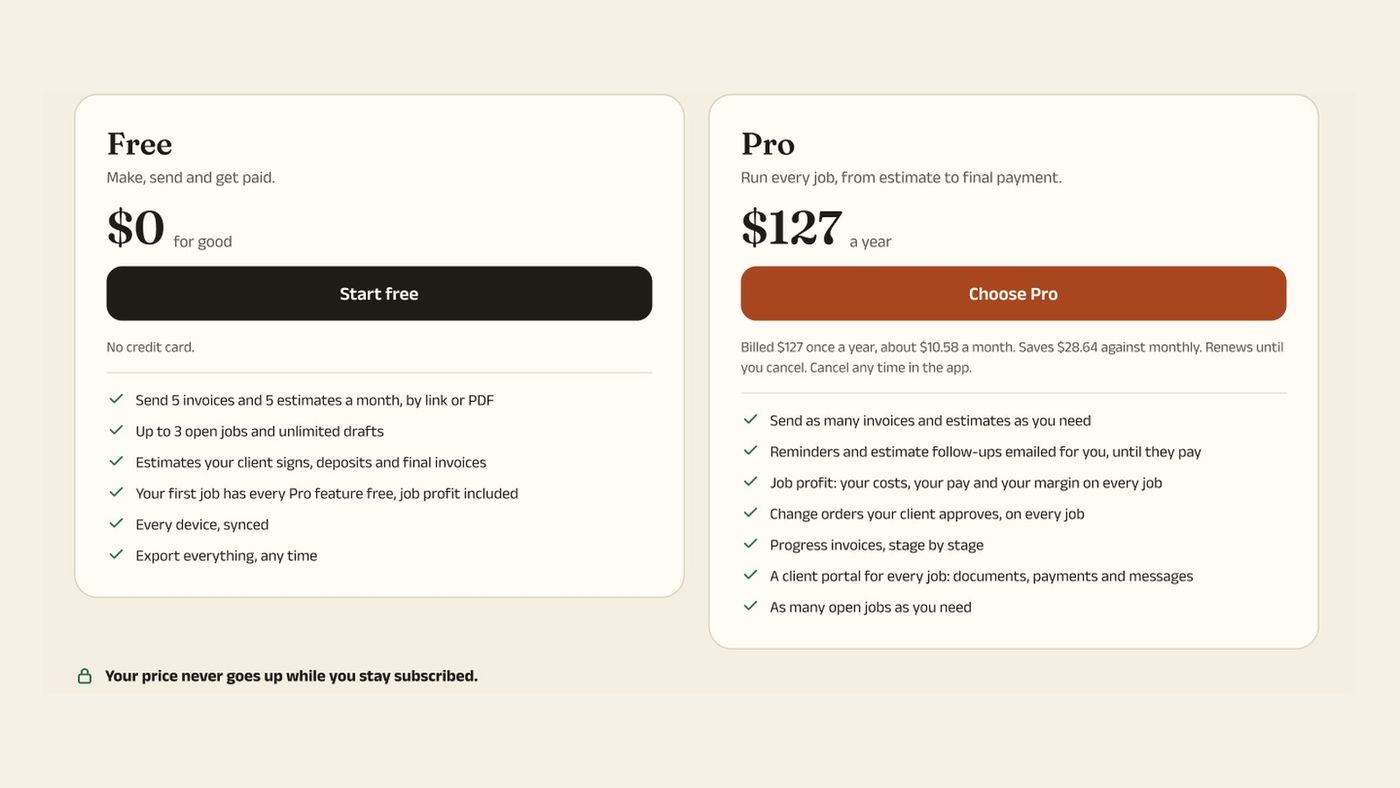
InvoiceWren has a free plan, and we state its limits so you can check them [5].
- What Free includes 5 invoices and 5 estimates a month, up to 3 open jobs, estimates your client signs, deposits and final invoices. That is 10 documents a month.
- What Pro adds Pro is $12.97 a month or $127 a year. It removes the limits and adds change orders, reminders and job profit. See pricing.
- The trade-off InvoiceWren does not process cards. Your client pays the link to your own account.
Before you start any trial
- I read the plan price on the screen.
- I wrote down the last day of the trial.
- I know how to cancel.
- I sent a test estimate and invoice to myself.
- I counted how many invoices I send in a month.
- I checked the pricing page in a browser.
Questions
Is Invoice Simple free?
The app is free to download, but the App Store lists paid plans as in-app purchases [1]. There is a 14-day trial according to its help center [2]. We did not find a plan with no payment that lasts beyond the trial.
Is there an Invoice Simple free trial?
Yes. A help page dated Mar 04 2025 says you can create and send as many invoices and estimates as you like for 14 days without a subscription 2. It does not say if a card is needed.
How many invoices can I send on the lowest paid plan?
Up to 3 invoices a month on Essentials, according to its help page [3]. Essentials costs $6.99 a month on the US App Store [1].
Is Invoice Simple free for estimates?
Not on a lasting basis, as far as we could read. The trial lets you send estimates for 14 days [2]. After that, the plan pages talk about invoices, and the Essentials page also mentions estimates in the same line [3].
Can I use Invoice Simple free forever?
We did not find a forever plan on any page we could read. The App Store says "Free · In-App Purchases", which means the download is free and the plans are bought inside the app [1].
Will Invoice Simple charge me after the trial?
The help page does not say. Read the sign-up screen, check your Apple account settings for the subscription, and set a reminder before day 14.
What is a free way to make one invoice?
A free generator makes a single document. freeinvoicegenerator.tools is ours. For clients, estimates and payments in one place, you need an app.
Which invoicing app has a free plan?
InvoiceWren Free covers 5 invoices and 5 estimates a month 5. Other apps also have free plans with limits. Compare the limits, not only the word "free".
Is "free" ever not free?
It can mean free to download, free for a trial, or free with limits. The honest question is: what do I pay in month two? Read the plan screen and the cancel steps before you start.
Related pages
Keep reading
 Comparing apps · 8 min readAre There Better Alternatives to Joist and Invoice Simple?Read it →
 Choosing an app · 8 min readWhat is the best estimate and invoice app for contractors? How to choose from your phoneRead it →
 Alternatives · 7 min readWhat are good Housecall Pro alternatives for small business that doesn't need dispatching?Read it →
Start on a plan that stays free
Send 5 invoices and 5 estimates a month, with your client's signature on the estimate.
Get started freeSources
- Invoice Simple on the App Store. Checked .
- Invoice Simple help: Does Invoice Simple offer a free trial?. Checked .
- Invoice Simple help: What is Invoice Simple Essentials?. Checked .
- Invoice Simple help: How can I get unlimited invoicing?. Checked .
- InvoiceWren pricing. Checked .
- Invoice Simple pricing page. Checked .
Prices and features change. We check these pages before each update. If something here is out of date, tell us at hello@invoicewren.com and we will fix it.