Jobber, honestly
Is Jobber worth it if I mostly send estimates and invoices?
Is Jobber worth it for a small business that mostly sends estimates and invoices? Count your real month first.
Updated · 8 min read

The short answer
Is Jobber worth it for small business owners who mostly send estimates and invoices? It can be, if you use the scheduling and team tools. For one user Jobber lists $29 to $49 a month for Core and $99 to $139 for Connect, plus card fees of 2.9% + 30¢. In our example the fees ($1,156.80 a year) cost more than the Core plan ($348.00).
Before you start: what "worth it" means
Jobber is a job management app. It does scheduling, quotes, invoices, payments and more. If you mostly send estimates and invoices, you may be paying for tools you never open. This guide helps you check, with one real month of your own work.
All Jobber prices and rules here come from Jobber's own pages, read on Nov 16 2026. Prices change, so check the page before you decide [1].
What Jobber charges for one user
Jobber shows three prices on each plan card: no commitment, a 1-year commitment, and billed annually. They are US dollars a month for one user, before sales tax [1].
| Plan | No commitment | 1-year commitment | Billed annually |
|---|---|---|---|
| Core | $49 | $39 | $29 |
| Connect | $139 | $119 | $99 |
| Grow | $199 | $169 | $149 |
Jobber pricing page, read Nov 16 2026. Plus starts at 5 users ($499, $439 or $399 a month). Extra users are $29 a month each [1].
What each plan gives you for estimates and invoices
Jobber's Connect plan adds the tools that many estimate and invoice users want: it lists automated client reminders, automated quote and invoice follow-ups, and QuickBooks Online sync [1]. Its help page says invoice follow-ups are on the Connect plan and up. You can send up to two reminders about invoices in "past due" status, and the longest wait you can set is 90 days [4].
On the estimate side, Jobber lets a client approve a quote online and draw or type their name. You can turn on a required signature [2]. You can ask for a deposit as a percentage or a fixed amount, and the client pays it before work can start [3]. Payment schedules and progress invoicing are on all plans [5].
We did not find change orders in Jobber's help center. If you change the price after approval, check how you would record it before you commit.

A four-step test: is Jobber worth it for you?
Use last month. If you do not have one yet, use your best guess for a normal month.
-
Count what you really did
Write down how many estimates and invoices you sent. Write down how many jobs you scheduled in Jobber, how many visits you booked, and how many times you used the map, the team tools or the time sheets.
Never skip counting only the work you did, not the features you hoped to use
-
Mark what only Jobber did for you
For each item, ask if a simpler tool could do the same. Estimates, invoices, deposits and reminders can be done by many apps. A busy schedule with a crew is where Jobber does more.
-
Add up the full yearly cost
Add the plan price for 12 months, any extra users at $29 a month, and the payment fees on what clients pay through Jobber [1]. See the worked example below.
year = plan × 12 + extra users × $29 × 12 + payment fees
-
Compare to what you would pay elsewhere
Price the same month in one other app. Include its payment fees too. Look at the whole year, not the first month.
A year of Jobber for a small estimate-and-invoice business
Made-up business: 6 invoices a month of $700.00 each. 4 are paid by card and 2 by bank payment. One user. Rates from Jobber's page: card 2.9% + 30¢, bank payment 1% 1.
| Card fee on one $700.00 invoice | $20.60 |
|---|---|
| Bank fee on one $700.00 invoice | $7.00 |
| Payment fees in one month (4 card + 2 bank) | $96.40 |
| Payment fees in a year | $1,156.80 |
| Core billed annually ($29 × 12) | $348.00 |
| Core with a 1-year commitment ($39 × 12) | $468.00 |
| Core with no commitment ($49 × 12) | $588.00 |
| Connect billed annually ($99 × 12) | $1,188.00 |
| Year on Core, billed annually, with fees | $1,504.80 |
| Year on Connect, billed annually, with fees | $2,344.80 |
The payment fees are 2.30% of the $50,400.00 invoiced. They are bigger than the Core plan price. Fees are not the same as a plan price, so a plan comparison that leaves them out is not the full bill.
When Jobber is worth it
It is likely worth it if you run a schedule, send crews to several jobs a day, and use the map, the visits and the team tools. It is also likely worth it if you want clients to pay inside the same app and you are happy with its payment rates.
It is also a fair choice when the whole team needs one place for the day's work. Jobber says all plans include payment schedules and progress invoicing [5], and Connect adds reminders [4].
When it may not be worth it
If you work alone or with one helper, mostly write estimates, send invoices and chase payments, you may be paying for scheduling you never open. The plan price is the smaller part. The card fee on each payment can cost more over a year, as the example shows.
You can also test the gap cheaply. Jobber's trial gives 14 days with full access to the Grow plan and no credit card required [1]. Use that fortnight with real jobs, then decide.
Rules by place: the United States
Prices on this page are in US dollars and before sales tax. Jobber says subscription prices exclude sales tax where it applies [1]. Whether you owe sales tax on your own work depends on your state, so ask your state revenue department; this is not tax advice.
| Question | Where to look |
|---|---|
| Do I owe sales tax on labor? | Your state revenue department |
| Do I have to report card income? | IRS Form 1099-K instructions |
| What does Jobber charge me for cards? | Jobber pricing page [1] |
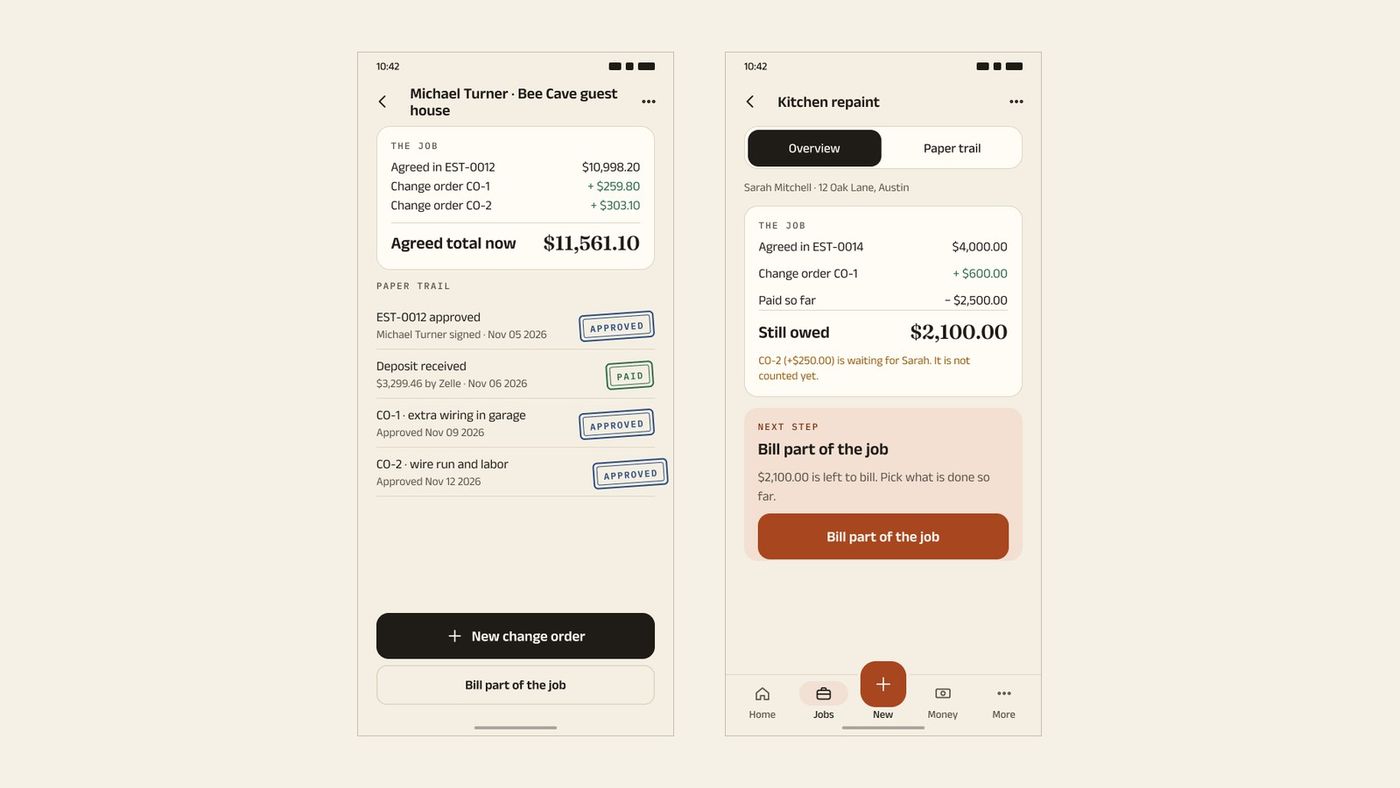
If you mostly send estimates and invoices, here is the InvoiceWren side
InvoiceWren is built for the estimate-to-invoice path. This is what exists today [6]:
- A free plan that does the core job Free covers 5 invoices and 5 estimates a month, estimates your client signs, deposits and final invoices.
- Change orders A client approves a change order and the job shows what was agreed, what changed and what is still owed. Pro has it on every job; Free has it on the first job.
- No fee on your client payments You paste the payment link of your own account. Whatever that account charges is its own. See Payments. InvoiceWren does not process cards.
Before you pay for Jobber (or leave it)
- I counted the estimates and invoices I sent last month.
- I listed every Jobber tool I used.
- I added the card and bank fees for a full year.
- I used the 14-day trial with real jobs.
- I checked how change orders would work for me.
- I priced the same year in one other app.
Questions
Is Jobber worth it for a small business?
It is worth it if you use its scheduling and team tools every week. If you mostly send estimates and invoices, count your costs first: plan price plus payment fees for a full year [1]. The worked example above shows both.
How much does Jobber cost for one user?
For one user, Core is $49 a month with no commitment, $39 with a 1-year commitment and $29 billed annually. Connect is $139, $119 or $99 [1]. These were Jobber's prices on Nov 16 2026, before sales tax.
Does Jobber have a free trial?
Yes. Jobber says you get 14 days of full access to the Grow plan with no credit card required [1]. Use real jobs in that time.
What does Jobber charge when a client pays by card?
Jobber lists 2.9% + 30¢ for a card payment, 2.7% + 30¢ for Tap to Pay and 1% for a bank payment. Instant payouts cost 1% more [1]. These fees come on top of the plan price.
Can Jobber send payment reminders automatically?
Yes, on Connect and above. Jobber's help page says invoice follow-ups are on the Connect plan and up, up to two reminders for invoices in "past due" status [4].
Can a client sign a Jobber quote and pay a deposit?
Yes. Jobber lets clients draw or type their name, and you can require a signature [2]. You can collect a deposit as a percentage or a fixed amount, and the client pays it before work can start [3].
Does Jobber have change orders?
We did not find a change order feature in Jobber's help center on Nov 16 2026. The only page that names them is about payment disputes. If you rely on change orders, ask Jobber how it handles them before you buy.
What is a simpler option than Jobber for estimates and invoices?
Many apps do estimates and invoices without scheduling. InvoiceWren has a free plan with 5 invoices and 5 estimates a month, and no fee on your client payments [6]. Read our cheaper Jobber options guide to compare.
Can I move my clients from Jobber to another app?
Usually yes, if you can export a client list as CSV or Excel. You can import your clients and items from a CSV or Excel file: the file is read on your device, every row is checked before anything is saved, and you can undo the import.
Related pages
Keep reading
 Comparing apps · 8 min readAre There Better Alternatives to Joist and Invoice Simple?Read it →
 Choosing an app · 8 min readWhat is the best estimate and invoice app for contractors? How to choose from your phoneRead it →
 Alternatives · 7 min readWhat are good Housecall Pro alternatives for small business that doesn't need dispatching?Read it →
Try the lighter way to run a job
Send an estimate, take the deposit, add a change and send the final invoice.
Get started freeSources
- Jobber pricing page. Checked .
- Jobber help: Quote approvals. Checked .
- Jobber help: Deposits on quotes. Checked .
- Jobber help: Invoice follow-ups. Checked .
- Jobber help: Payment schedules and progress invoicing. Checked .
- InvoiceWren pricing. Checked .
Prices and features change. We check these pages before each update. If something here is out of date, tell us at hello@invoicewren.com and we will fix it.