Comparing apps
Why Is Jobber So Expensive? What the Bill Is Made Of
Jobber's bill is not one number, so this guide takes it apart piece by piece, using only what Jobber publishes.
Updated · 7 min read
The short answer
Why is Jobber so expensive? The bill has four parts. The plan: one user is $29 to $49 a month on Core and $99 to $139 on Connect. [1] How you commit: annual billing is cheapest. [1] Extra users: $29 a month each. [1] And payment fees: 2.9% + 30¢ on cards. [1] Jobber also does scheduling and team work that a paperwork app does not.
Part 1: the plan you pick
Jobber sells Core, Connect and Grow for one user, and Plus for bigger teams. Its page lists Core at $29, $39 or $49 a month, Connect at $99, $119 or $139, and Grow at $149, $169 or $199, depending on how you pay. [1]
Each step up adds tools. Core lists quotes, invoices and online payments. Connect adds automated client reminders and quote and invoice follow-ups. [1] Grow adds more, such as job costing and two-way text messages. [1]
That is why the bill climbs. A reminder, which many small businesses want, sits on the second plan, not the first.
Part 2: how you commit changes the price
| Plan (1 user) | No commitment | 1-year commitment | Billed annually |
|---|---|---|---|
| Core | $49 | $39 | $29 |
| Connect | $139 | $119 | $99 |
| Grow | $199 | $169 | $149 |
US dollars a month for one user, Jobber's pricing page, read Nov 14 2026. [1]
Part 3: users and add-ons
Jobber says a user is anyone who opens your account at the office or in the field to see or manage the schedule. [1] Plans include 1, 5, 10 or 15 users, and extra users are $29 a month each. [1]
Add-ons are separate. Jobber lists extras such as a marketing tool and an AI receptionist for an extra monthly price. [1] Check the page for today's prices before you count them.
Part 4: payment fees
When a client pays through Jobber, you pay a fee: 2.9% + 30¢ for a card, 2.7% + 30¢ for Tap to Pay and 1% for a bank payment. Instant payouts cost 1% more. [1]
Jobber's help page says the bank fee comes out of the payment total. [2] These fees go to the payment side, not to the plan, so they are in addition to the monthly price.
A year on Connect, added up
A made-up business: Connect, one user, $60,000 in payments a year spread over 60 invoices of $1,000.00 each, all paid by card.
| Connect, billed annually: $99 × 12 | $1,188.00 |
|---|---|
| Card fees: 2.9% of $60,000.00 | $1,740.00 |
| Card fees: 30¢ × 60 payments | $18.00 |
| Total for the year | $2,946.00 |
| If all paid by bank instead: 1% of $60,000.00 | $600.00 |
$1,188.00 + $1,740.00 + $18.00 = $2,946.00. On annual billing the plan is $99 × 12 = $1,188.00. With no commitment the same plan is $139 × 12 = $1,668.00, which is $480.00 more. [1]
Is it expensive, or just a lot of software?
Be fair. Jobber is a field-service app. It books and schedules jobs, manages a team, and sends clients reminders. If you use those, the price may be fair. If you use only quotes and invoices, you pay for a lot you do not open.
We did not read Jobber's reasons for its prices, and we do not guess them. For how its prices have moved, see what changed in Jobber's pricing.

Which part of the bill can you change?
Not every part can move. Use last month's real numbers.
-
The commitment
Connect for one user is $139 a month with no commitment and $99 on annual billing [1]. Moving to annual billing saves $480.00 a year on the same plan, if you are sure you will stay a year.
-
The users
Extra users are $29 a month each [1], or $348.00 a year per user. Count who really opens the account.
-
The payment route
In the example above, 60 invoices of $1,000.00 paid by card cost $1,758.00 in fees, and the same 60 paid by bank cost $600.00, a difference of $1,158.00 [1][2]. Ask clients who can pay by bank to do so.
-
The plan itself
Ask whether the tools on the plan above yours are the ones you really use. If most of your use is estimates, changes and invoices, a smaller app does that for less.
Questions to ask before you renew
Taken together, the first three changes in the list above would save $1,638.00 in the example year, without changing apps. Whether you can do all three depends on your clients and your team.
Ask yourself: which features did I open in the last three months? How many people really use the account? What did I pay in payment fees last month? If you cannot answer, the bill is paying for software you have not looked at in a while. Compare with InvoiceWren's pricing and its estimates, and read a Jobber cheaper alternative.
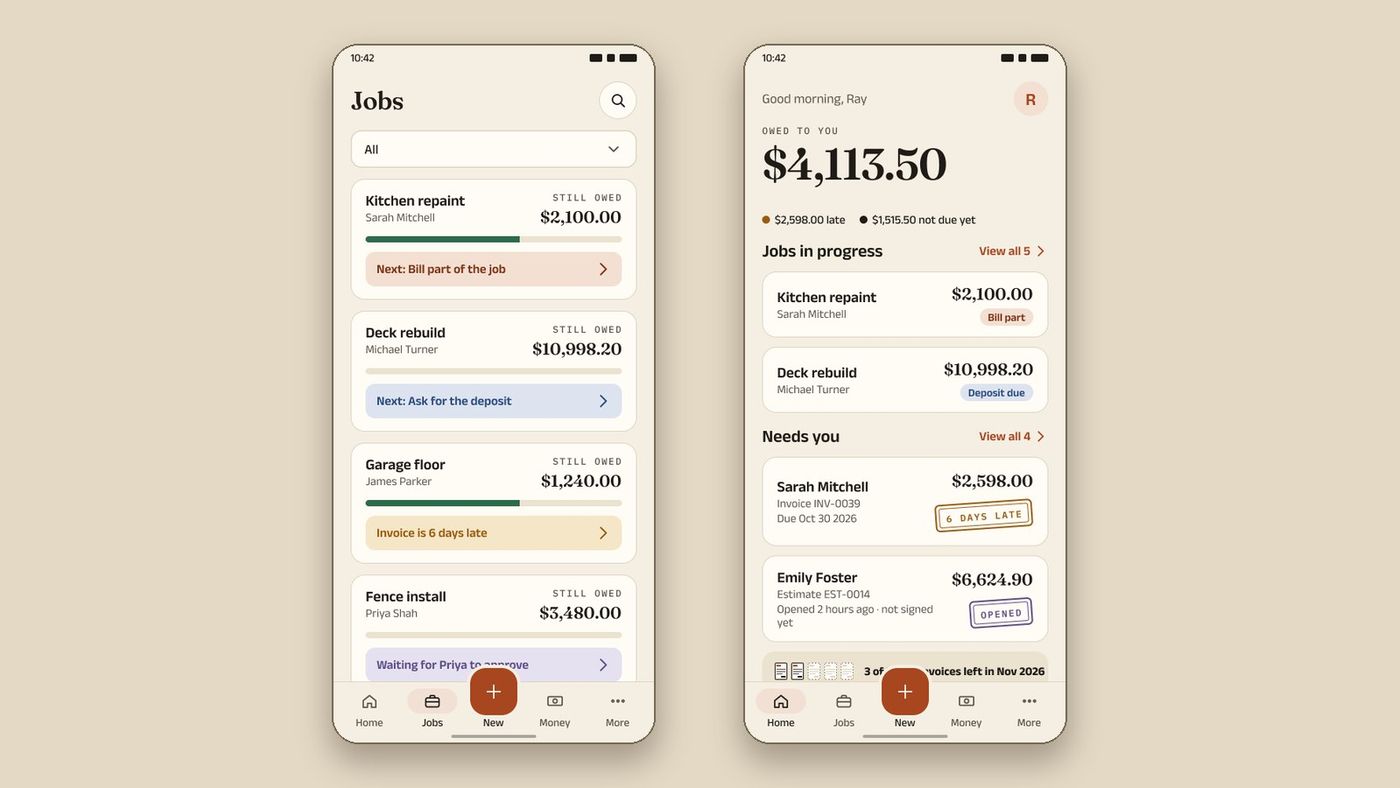
A simpler way to send estimates and invoices
InvoiceWren does the paperwork side of a job, and not the scheduling. These features exist today.
- A free plan, then one paid plan Free sends 5 invoices and 5 estimates a month. Pro is $12.97 a month or $127 a year, with no per-user fee for the work you do.
- Reminders on Pro, and on your first job InvoiceWren emails your client about a late invoice and stops when you confirm the payment.
- Change orders and progress invoices Your client approves a change before you start. Bill in stages, with a balance that adds up line by line.
- No fee on payments Your client pays you directly. We take no fee. Your own Stripe link, if you add one, has Stripe's fee.
How to lower a Jobber bill
- I checked whether annual billing saves money for me
- I counted my users and removed any I do not need
- I asked clients to pay by bank where they can
- I compared the plan I use with the one I pay for
- I wrote down what I would lose by leaving
Questions
Why is Jobber so expensive?
Its bill is the plan, how you commit, extra users and payment fees, and it includes scheduling and team tools. [1] If you only use quotes and invoices, much of that is unused.
How much does Jobber cost for one user?
Core is $29 to $49 a month, Connect $99 to $139 and Grow $149 to $199, by how you commit. [1] Prices are for one user, before sales tax. [1]
Does Jobber charge for each user?
Plans include 1, 5, 10 or 15 users. Extra users are $29 a month each. [1]
Does Jobber charge fees on payments?
Yes: 2.9% + 30¢ on cards, 2.7% + 30¢ for Tap to Pay and 1% for bank payments. [1] Instant payouts cost 1% more. [1]
Is there a cheaper alternative to Jobber?
If you need estimates, changes and invoices rather than scheduling, InvoiceWren has a free plan and a $12.97 monthly Pro plan. [3] See our guide to a cheaper alternative to Jobber.
Is Jobber worth it for a very small business?
It depends on how much of it you use. If you schedule jobs and use its reminders and routes, the price may be fair. If you only send estimates and invoices, a smaller app costs less.
Can I pay for Jobber monthly and still save?
On the page we read, no commitment is the most expensive route and annual billing the cheapest [1]. A one-year commitment sits in between. Compare the three before you choose.
How do I lower the payment fees I pay?
Fees depend on the route. Jobber lists 2.9% + 30¢ for cards and 1% for bank payments [1]. Ask clients to pay by bank when they can.
Related pages
Keep reading

Try the paperwork side free
5 invoices and 5 estimates a month, free. Your first job has every Pro feature.
Get started freeSources
- Jobber pricing page. Checked .
- Jobber help: Bank Payments (ACH). Checked .
- InvoiceWren pricing. Checked .
Prices and features change. We check these pages before each update. If something here is out of date, tell us at hello@invoicewren.com and we will fix it.