Comparing apps
Jobber Cheaper Alternative: 3 Ways to Pay Less as a Small Business
This guide is for a small service business that pays for Jobber and wants to pay less without losing what it really uses.
Updated · 7 min read

The short answer
A Jobber cheaper alternative comes in three kinds: drop to a lower Jobber plan, move to an app built for estimates and invoices, or use two simple tools. On Nov 14 2026 Jobber Core was $29 a month on annual billing for one user. [1] Joist Pro was $17 a month. [2] Invoice Simple Premium was $21.99. [3] InvoiceWren Pro is $12.97, with a free plan. [4]
First, find out what you use
A cheaper app only helps if it does what you use. Open Jobber and write down which tools you opened in the last month. Scheduling a crew? Sending quotes? Sending invoices? Automated reminders? Collecting payments?
If most of your use is quotes, changes and invoices, a smaller app can do it for less. If you schedule a team every day, Jobber's price may be fair for what it does.

Cut the bill without leaving first
Before you switch, change what you can on the plan you have. On the page we read on Nov 14 2026, the same Connect plan for one user was $139 a month with no commitment and $99 with annual billing [1]. That is $480.00 a year for the same tools. Annual billing asks for a year of commitment, so only choose it if you are sure.
Check the users. Extra users are $29 a month each [1], which is $348.00 a year per user. If a user has not opened the account in months, remove them. Check the add-ons the same way.
Three routes to a lower bill
Try them in this order. The first costs nothing to try.
-
Stay on Jobber, and pay for less
Jobber's page lists Core, Connect and Grow. For one user, Core is $29 a month on annual billing, $39 with a 1-year commitment and $49 with no commitment. [1] Connect is $99, $119 or $139. [1]
Core lists quotes, invoices and online payments. Connect adds automated client reminders and follow-ups. [1] If you do not need those, Core costs less than half of Connect. Also check your user count: extra users are $29 a month each. [1]
Helps avoid paying for reminders you never turn on
-
Move the paperwork to an app built for it
Apps such as Joist, Invoice Simple and InvoiceWren focus on estimates and invoices. They cost less because they do less. They do not run a crew's calendar.
Compare the plan that lists what you need, not the cheapest plan. The cheapest plans cap how many documents you can send. [2][3]
Never skip the plan that includes the features you use every week
-
Split the job into two simple tools
Some businesses keep a plain calendar for scheduling and use a paperwork app for money. It is more tapping between apps, but each tool can be small and cheap.
Only do this if you do not schedule a team. Two apps mean two places to look when a client calls.
Helps avoid paying team prices for solo scheduling
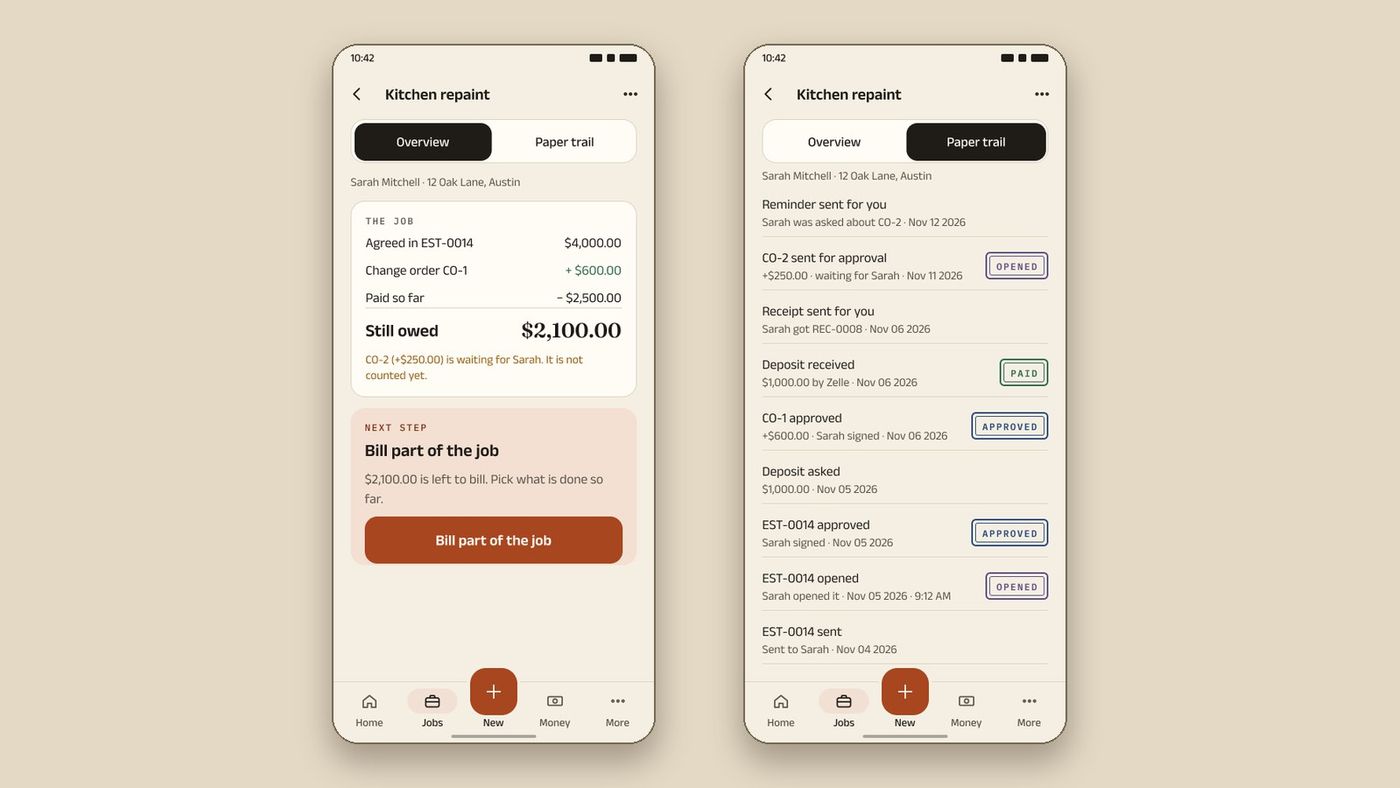
InvoiceWren is built for route two: the estimate your client signs, changes they approve, stage invoices and payments, all on one job.
How to run a switch without losing a week
Move one job at a time. A clean switch takes about two weeks.
-
Run both for a short time
Keep Jobber until your open jobs are finished. Start new estimates in the new app.
-
Export before you cancel
Export your client list and keep PDFs of open estimates and unpaid invoices. You can import your clients and items from a CSV or Excel file: the file is read on your device, every row is checked before anything is saved, and you can undo the import.
-
Tell your clients
Tell clients where invoices will come from and where to pay. A short email is enough.
Never skip cancelling before the last invoice is paid
-
Cancel last
When the last invoice from the old app is paid, cancel. Check the date your plan renews so you do not pay for another term.
Who should not switch
Be honest with yourself. If you schedule a crew every day, send routes, or have several office users, Jobber does work that InvoiceWren, Joist and Invoice Simple do not. The price may be fair for what you use.
The switch makes sense when most of your use is estimates, changes and invoices. Then a smaller app does that work for less, and your payments can cost less too.
What each route costs and what you give up
| Option | Price for one user | What you give up |
|---|---|---|
| Jobber Core, billed annually | $29 a month [1] | Automated reminders (listed on Connect) |
| Joist Pro | $17 a month [2] | Scheduling; change orders are on Elite at $32 [2] |
| Invoice Simple Premium | $21.99 a month [3] | Scheduling; change orders not listed [3] |
| InvoiceWren Pro | $12.97 a month, or $127 a year [4] | Scheduling, expense tracking, card payments inside the app |
| InvoiceWren Free | $0: 5 invoices and 5 estimates a month [4] | Higher volume; Pro features after your first job |
US dollars, Nov 14 2026. Plans can change; check each page.
A year of each, added up
One user, unlimited documents where the plan allows it. Made-up sums from the prices above.
| Jobber Connect, annual billing: $99 × 12 | $1,188.00 |
|---|---|
| Jobber Core, annual billing: $29 × 12 | $348.00 |
| Invoice Simple Premium: $21.99 × 12 | $263.88 |
| Joist Pro: $17 × 12 | $204.00 |
| InvoiceWren Pro, yearly price | $127.00 |
$99 × 12 = $1,188; $29 × 12 = $348; $21.99 × 12 = $263.88; $17 × 12 = $204. Joist and Jobber list lower prices on annual billing in places, so check the pages. [1][2][3][4]
Do not forget the payment fees
The app price is one part. Jobber lists 2.9% + 30¢ on cards and 1% on bank payments. [1] Joist lists up to 3.49% + 49¢ on cards. [5] On a $1,000.00 invoice paid by card that is $29.30 on Jobber and up to $35.39 on Joist.
InvoiceWren adds no payment fee: your client pays you directly by Zelle, bank transfer or your own link. [4] Our guide to a Jobber alternative with no processing fees explains the trade.
Before you switch
- I listed the Jobber tools I used last month
- I checked whether Core would do the job
- I exported my client list
- I compared card fees as well as plan prices
- I tested one real estimate in the new app before I cancelled
Questions
What is a cheaper alternative to Jobber?
It depends on what you use. For estimates and invoices, Joist, Invoice Simple and InvoiceWren cost less than Jobber Connect. [1][2][3][4] None of them replaces Jobber's crew scheduling.
What is the cheapest Jobber plan?
Core, at $29 a month for one user on annual billing. [1] With no commitment it is $49. [1]
Is there a free alternative to Jobber?
InvoiceWren has a free plan with 5 invoices and 5 estimates a month. [4] It does not schedule a team. Jobber offers a 14-day free trial. [1]
Will I lose my data if I leave Jobber?
Export your client list before you cancel. Check what each app can import. InvoiceWren can import clients from a CSV or Excel file.
Why is Jobber more expensive than Joist or Invoice Simple?
Jobber is a larger field-service app with scheduling and team tools, and extra users cost $29 a month each. [1] Read what the Jobber bill is made of.
Can I keep Jobber and also use InvoiceWren?
Yes. Some owners keep Jobber for scheduling and use InvoiceWren for estimates, changes and invoices. That costs more than one app, so do it only if you use Jobber's scheduling.
How long does it take to switch?
About two weeks for most small businesses: one to run both, one to finish open jobs and move clients. Do not cancel until the last invoice from the old app is paid.
Related pages
Keep reading

Try the cheaper side of the job
Start free, send an estimate and see what your client sees.
Get started freeSources
- Jobber pricing page. Checked .
- Joist pricing page. Checked .
- Invoice Simple pricing plans. Checked .
- InvoiceWren pricing. Checked .
- Joist support: transaction fee for Joist Payments. Checked .
Prices and features change. We check these pages before each update. If something here is out of date, tell us at hello@invoicewren.com and we will fix it.