Compared
Jobber vs Joist: which is better for a small contractor?
Jobber vs Joist comes down to your jobs: crews and schedules, or simple estimates, invoices and changes.
Updated · 7 min read

The short answer
Jobber vs Joist for a small contractor: Joist Pro is cheaper on the plan ($17 a month) and Jobber is cheaper on card fees (2.9% + 30¢ against up to 3.49% + 49¢). In our example year the totals were $1,504.80 for Jobber Core and $1,568.16 for Joist Pro. Joist has change orders on Elite only, for invoices only.
Before you start: two different kinds of app
Jobber and Joist both send estimates and invoices, and both take payments. They are not the same size. Jobber is built around running jobs, schedules and visits. Joist says it is "built specifically for contractors, with simple tools to estimate jobs, send invoices, and get paid" [2].
This guide compares them on what a small contractor does every week: write an estimate, get it signed, take a deposit, change the price, send the invoice and get paid. Every price and rule is from each company's own page, read on Nov 16 2026. Prices change, so open the pages before you buy [1][2].
Jobber and Joist side by side
US dollars a month, as each page lists them. Jobber shows three prices per plan (no commitment, 1-year commitment, billed annually). Joist lists Basics at $12, Pro at $17 and Elite at $32 a month and shows a lower annual price on Basics and Elite, so the table uses the monthly figure.
| What you check | Jobber | Joist |
|---|---|---|
| Lowest paid plan for one user | Core: $49, $39 or $29 [1] | Basics: up to 5 documents a month; the figures shown are $12, $10 and $8.34 [2] |
| Unlimited documents | Core and up (not stated as a limit) [1] | Pro at $17 a month [2] |
| Plan with automatic client reminders | Connect: $139, $119 or $99 [1][4] | Not found; Joist's help page describes sending a reminder by hand [9] |
| Change orders | Not found in the help center | Elite at $32 a month, invoices only [5] |
| Card payment fee | 2.9% + 30¢ [1] | up to 3.49% + 49¢ [6] |
| Bank payment fee | 1% [1] | 1%, capped at $15 [6] |
| Free trial | 14 days, full access to Grow, no card [1] | 14 days, no card; no free plan [2] |
Jobber pricing page, Joist pricing page and Joist transaction fee article, read Nov 16 2026.
What each one does well for estimates
Jobber lets a client approve a quote online and draw or type their name. You can require a signature, and ask for a deposit as a percentage or a fixed amount that the client pays before work can start [3]. Its payment schedules and progress invoicing are on all plans [1].
Joist's help center describes a signature that the client types, and a deposit that shows on the estimate or invoice as "Deposit Due" [7]. The help articles we read do not say which Joist plan has them, so check the pricing page before you rely on either.

Where change orders decide it
A change order is a written change to the price after the client said yes. Joist's help article says "change orders are for invoices only and a Joist Elite subscription is required to use change orders", and that the feature "is not available for estimates" [5]. So a change before the invoice stage is not covered by that feature.
We did not find change orders in Jobber's help center. You can still change a quote or add a line, but check how it keeps the old price, the new price and the client's yes together. If your jobs change often, this is the first thing to test.
A year of each, for the same small business
Made-up business: 6 invoices a month of $700.00. 4 are paid by card and 2 by bank. One user. Card fees at Joist's highest listed rate.
| Jobber card fee on $700.00 (2.9% + 30¢) | $20.60 |
|---|---|
| Joist card fee on $700.00 (3.49% + 49¢, the top rate) | $24.92 |
| Bank fee on $700.00, either app | $7.00 |
| Jobber payment fees, 12 months | $1,156.80 |
| Joist payment fees, 12 months | $1,364.16 |
| Jobber Core billed annually, 12 months | $348.00 |
| Joist Pro, 12 months at $17 | $204.00 |
| Joist Elite, 12 months at $32 | $384.00 |
| Jobber Core year with fees | $1,504.80 |
| Joist Pro year with fees | $1,568.16 |
| Joist Elite year with fees (adds change orders) | $1,748.16 |
Joist is cheaper on the plan and Jobber is cheaper on card fees at these rates. The plan price is the smaller number in both years. Joist says "up to" 3.49%, so your rate may be lower.
How to choose in one afternoon
Test both with one real job.
-
Pick a job that changed
Choose last month's job that had a change after the yes. A job with no surprises will not show the difference.
-
Run the trial in both
Both trials last 14 days and neither asks for a card [1][2]. Write the estimate, send it to your own phone and sign it as the client.
-
Change the price
Add the change in each app. Ask: can the client see the old price, the new price and what they agreed to?
Never skip testing the change, not only the first estimate
-
Add the fees
Use last month's payments and each app's rates. Compare the whole year, as the example above does.
Rules by place: the United States
Both companies are US-based apps and both list prices in dollars. Sales tax on your work depends on your state, so ask your state revenue department. This is not tax advice.
Where InvoiceWren fits
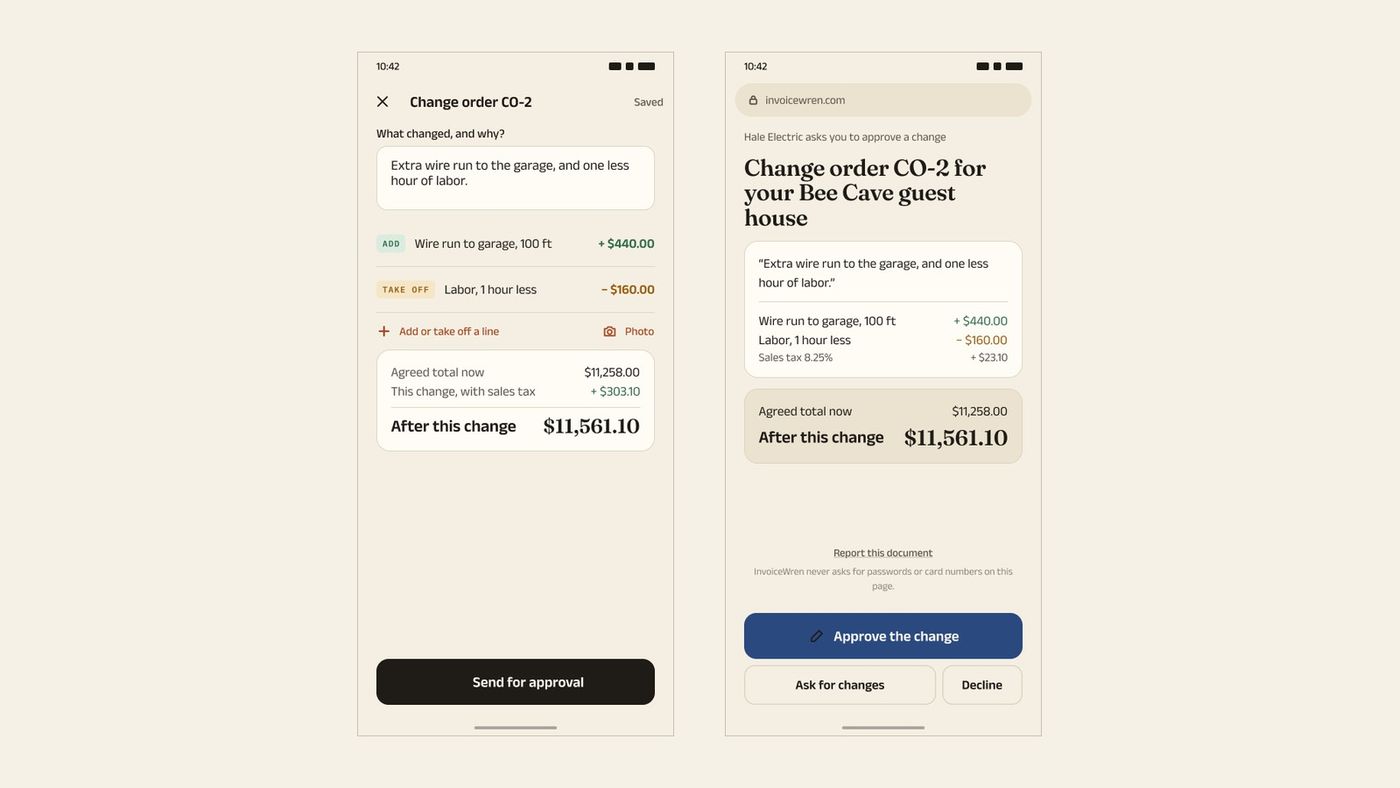
InvoiceWren is a third option for a contractor who wants the estimate-to-invoice path with changes kept in one place [8].
- Change orders on the job A change order is approved by the client and added to the same job. Pending changes are never counted as approved.
- A free plan Free covers 5 invoices and 5 estimates a month. Pro is $12.97 a month or $127 a year. See pricing.
- The trade-off InvoiceWren does not process cards. You paste the link to your own account, and your client pays you directly.
Before you pick one
- I tested a job with a price change.
- I checked which plan has the features I need.
- I added card and bank fees for a full year.
- I counted how many users I need.
- I read each page again today.
- I know how to export my clients if I leave.
Questions
Is Jobber better than Joist?
Neither is better for everyone. Jobber suits businesses that run schedules and crews. Joist suits a contractor who wants simple estimates and invoices [1][2]. The best test is one real job with a price change in each app.
Which is cheaper, Jobber or Joist?
On the plan price, Joist Pro at $17 a month ($204.00 a year) is lower than Jobber Core billed annually at $29 a month ($348.00). On card fees, Jobber's 2.9% + 30¢ is lower than Joist's top rate of 3.49% + 49¢ 16. In our example the full year was $1,504.80 for Jobber Core and $1,568.16 for Joist Pro.
Does Joist have a free plan?
No. Joist says its free plan is no longer available and offers a 14-day trial with no credit card [2]. Jobber also has a 14-day trial with no card [1].
Does Joist have change orders?
Yes, on Joist Elite. Joist's help article says change orders are for invoices only and need Elite [5]. Elite lists at $32 a month.
Does Jobber have change orders?
We did not find a change order article in Jobber's help center on Nov 16 2026. If you need them, ask Jobber and test how a changed price is kept next to the first quote.
What are the card fees for Jobber and Joist?
Jobber lists 2.9% + 30¢ for a card, 2.7% + 30¢ for Tap to Pay and 1% for a bank payment [1]. Joist lists up to 3.49% + 49¢ for a card and 1% with a $15 cap for a bank payment [6].
Can both send automatic payment reminders?
Jobber can, on Connect and up: up to two reminders for past-due invoices [4]. The Joist help article we read describes sending a reminder by hand, and we did not find an automatic one [9].
Which is better for a contractor who works alone?
Both work for one user. Joist is built for contractors and has the lower plan price. Jobber is stronger if you also schedule visits. Pick the one that handles your changes and your payments the way you work.
Is there an app with no fee on client payments?
InvoiceWren takes no fee on your client payments, because the payment goes to your own account [8]. Your own account may charge its own fees. See also our Joist alternatives.
Related pages
Keep reading
 Compared · 7 min readInvoice Simple vs Joist: which one fits a small contractor?Read it →
 Comparing apps · 8 min readAre There Better Alternatives to Joist and Invoice Simple?Read it →
 Choosing an app · 8 min readWhat is the best estimate and invoice app for contractors? How to choose from your phoneRead it →
See a change order done start to finish
Send an estimate, get it signed, add a change and see the balance explained.
Get started freeSources
- Jobber pricing page. Checked .
- Joist pricing page. Checked .
- Jobber help: Quote approvals. Checked .
- Jobber help: Invoice follow-ups. Checked .
- Joist help: Change orders. Checked .
- Joist help: transaction fee for Joist Payments. Checked .
- Joist help: request a deposit on an estimate or invoice. Checked .
- InvoiceWren pricing. Checked .
- Joist help: request payment for an overdue invoice. Checked .
Prices and features change. We check these pages before each update. If something here is out of date, tell us at hello@invoicewren.com and we will fix it.