Payments and fees
Square invoice fees: what do you actually pay on a $500 job?
Square invoice fees are small on paper and add up in a month.
Updated · 8 min read

The short answer
Square invoice fees on a $500.00 job are $16.80 by card on Square Free (3.3% + 30¢), $14.80 on Plus or Premium (2.9% + 30¢) and $5.00 by bank transfer (1%, $1 minimum). So you keep $483.20, $485.20 or $495.00. These are Square's rates on Nov 16 2026.
Before you start: what "the fee" means
Square sends an invoice for you, and when your client pays by card or bank, Square takes a processing fee out of the payment. The invoice itself is not what costs money. The payment is. Square says its Free plan has "no monthly subscription costs", and that you pay processing fees when you take a payment [2].
So the question is not "what does a Square invoice cost?" The question is "how much of a $500 payment do I keep?" This guide answers that with Square's own rates, read on Nov 16 2026 [1]. Rates change, so check the page before you decide.
Square invoice fees by plan
These are the rates for payments made through an invoice, as Square lists them [1]. Square Free, Square Plus and Square Premium are Square's own plan names.
| What the client pays with | Square Free | Square Plus and Premium |
|---|---|---|
| Card, online or by invoice | 3.3% + 30¢ | 2.9% + 30¢ |
| Bank transfer (ACH), by invoice | 1%, $1 minimum | 1%, $1 minimum, $10 cap |
| Card typed in or on file | 3.5% + 15¢ | Not read; see the page |
Square help article "What are Square's fees?", read Nov 16 2026. We did not read the monthly price of Plus or Premium, so it is not in this table.
A $500 job: what lands in your account
Made-up job, one invoice for $500.00, paid in one piece. Every figure is worked out by a script from the rates above.
| Invoice total | $500.00 |
|---|---|
| Fee if the client pays by card (Square Free: 3.3% + 30¢) | $16.80 |
| You keep (card, Square Free) | $483.20 |
| Fee if the client pays by card (Square Plus: 2.9% + 30¢) | $14.80 |
| You keep (card, Square Plus) | $485.20 |
| Fee if the client pays by bank transfer (1%, $1 minimum) | $5.00 |
| You keep (bank transfer) | $495.00 |
On a $500 job, the card fee on Square Free is more than three times the bank fee.

Why the number surprises people
The percentage is small, so it is easy to ignore. The 30¢ is the part people forget, because it is charged on every payment, big or small. A $40 payment loses 30¢ no matter what.
A deposit makes this worse. If you take a $200.00 deposit and a $300.00 final payment, both by card on Square Free, you pay $6.90 and $10.20. That is $17.10 in all, which is $0.30 more than one $500.00 payment would cost ($16.80). Two payments mean two 30¢ charges.
A comment on a video said a $401 job came to $379.44 after Square fees. We could not check that, and by Square's own rate the card fee on $401.00 is $13.53, which leaves $387.47. If your number is lower than that, look for an extra charge such as sales tax added to the invoice, an instant transfer fee or a different plan.
How to work out your own fee in five minutes
Do this once with your last month of invoices.
-
Find your plan
Open your Square account and check whether you are on Square Free, Plus or Premium. The card rate is 3.3% + 30¢ on Free and 2.9% + 30¢ on the other two [1].
-
List last month's payments
Write down each payment, how the client paid, and the amount. Count a deposit and a final payment as two payments.
-
Work out the fee for each one
Multiply the amount by the percentage, then add the fixed amount.
fee = amount × rate + fixed amount
Example: $500.00 × 3.3% + $0.30 = $16.80
Never skip counting the 30¢ on every small payment
-
Add them up and compare
Divide the total fees by the total you invoiced. If you invoiced $5,000.00 in ten $500.00 jobs paid by card on Square Free, the fees are $168.00. The same ten jobs paid by bank transfer cost $50.00. The difference is $118.00 a month.
Ways to keep more of each payment
You cannot change Square's rate, but you can change what happens before the payment.
- Offer a bank payment. Square lists 1% with a $1 minimum for a bank payment through an invoice [1]. On a $5,000.00 job that is $50.00 on Square Free, against $165.30 by card. On Plus and Premium the bank fee stops at $10, so the same job costs $10.00.
- Take fewer, larger payments. One payment of $500.00 costs one 30¢ charge. Four payments of $125.00 cost four.
- Price the fee in. If most of your clients pay by card, work the fee into your price the way you work in fuel and insurance. Do not hide it on the invoice. Ask your processor and your state's rules before you add a surcharge: we did not read those rules, so this is not advice.
- Use a different way to be paid. A direct bank transfer, Zelle or a check has no processing fee in the app, though your bank may have its own rules.
How other tools price a card payment
Same $500.00 invoice, same card payment. These are the rates on each company's own page, read Nov 16 2026.
| Tool | Card rate on its page | Fee on $500.00 |
|---|---|---|
| Square Free, invoice | 3.3% + 30¢ [1] | $16.80 |
| Square Plus or Premium, invoice | 2.9% + 30¢ [1] | $14.80 |
| Joist, card payment | up to 3.49% + 49¢ [3] | $17.94 at the top rate |
| Housecall Pro, online invoice | 2.99% per transaction [4] | $14.95 |
| InvoiceWren | No fee on your client payments [5] | Your own account's fee applies |
Housecall Pro lists 2.99% with no fixed amount on its help page. Joist says "up to" 3.49%.
Rules by place: the United States
This guide is about US sellers. Card fees are the same whatever your state, but sales tax and the rules about adding a card surcharge vary by state. Check with your state revenue department and your card processor; we did not read those rules, so none of this is tax or legal advice.
One more US rule matters if you take many payments through apps. The IRS says a third party settlement organization reports payments to the IRS when a payee passes $20,000 and more than 200 transactions [6]. Keep your own records of every payment either way. The fee is part of your cost, so your records should show the full amount the client paid and the fee separately.
How InvoiceWren handles this
InvoiceWren does not process cards, so it does not take a fee from your client payments [5]. See how payments work and the Free and Pro plans. What it does:
- Your link, your account You paste the payment link of your own account, such as Zelle or a bank transfer. Your client pays you directly. Whatever that account charges is between you and it.
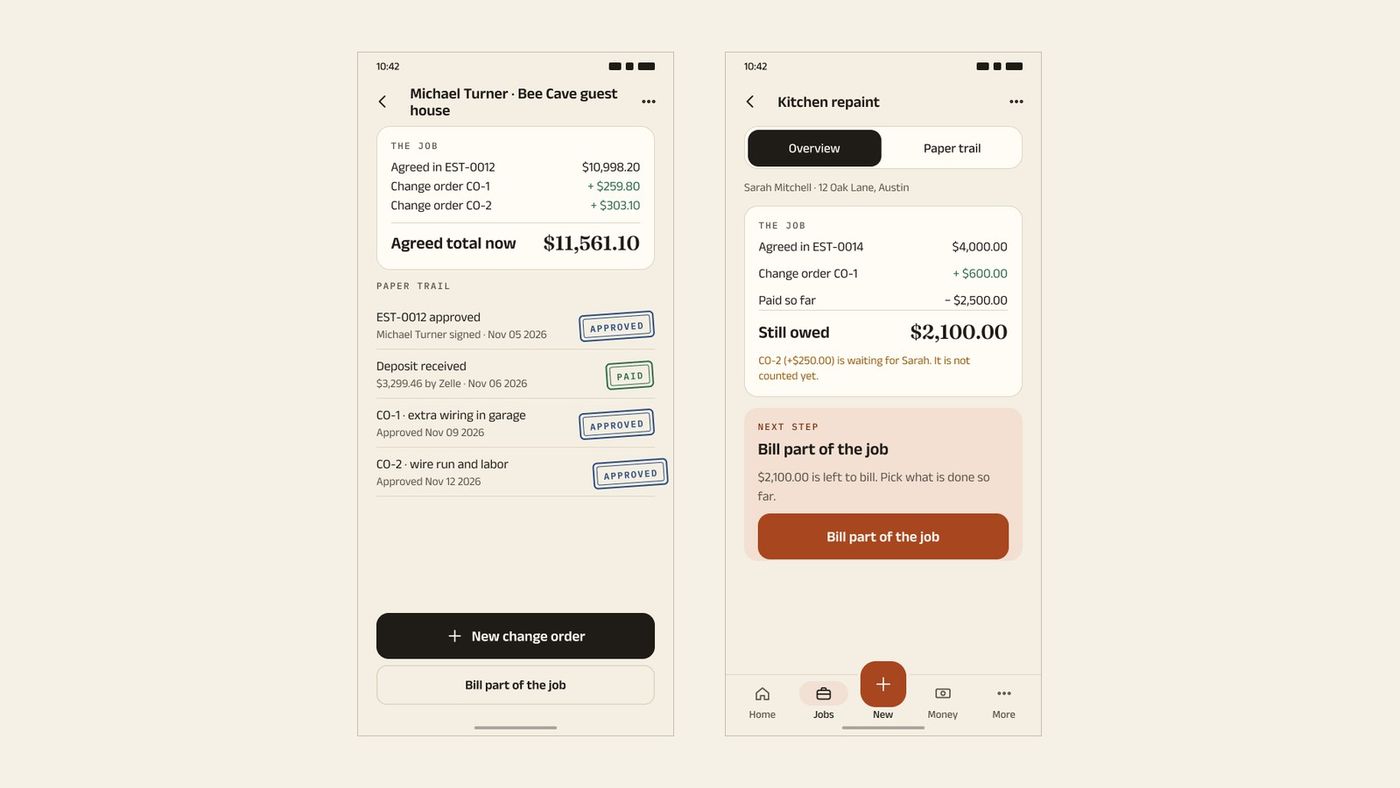
- A balance you can explain Deposits, final payments and change orders sit on one job, so the amount still owed is explained line by line. A payment is never counted twice.
- You confirm every payment Your client taps "I've paid" and you confirm it. The app never marks an invoice paid from a click alone.
Before you send the next invoice
- I know which Square plan I am on and its card rate.
- I worked out the fee on my last five payments.
- I offered a bank payment on any job over $1,000.00.
- I counted a deposit and a final payment as two payments.
- I record the fee as a cost in my own books.
- I checked state rules before adding any card surcharge.
Questions
What are Square's invoice fees?
Square lists 3.3% + 30¢ for a card payment by invoice on Square Free and 2.9% + 30¢ on Plus and Premium. A bank payment by invoice is 1% with a $1 minimum, and on Plus and Premium it stops at $10 [1]. These are the rates on Square's page on Nov 16 2026.
Does Square charge to send an invoice?
Square says Square Free has no monthly subscription costs, and that you pay processing fees when you take a payment [2]. So sending an invoice on that plan has no separate charge in what we read. Paid plans have a monthly price that we did not read.
How much is the Square fee on a $500 invoice?
By card on Square Free it is $16.80, so you keep $483.20. On Plus or Premium it is $14.80. By bank transfer it is $5.00 1.
Is the bank payment cheaper than a card payment on Square?
Yes, by Square's rates. On a $500.00 invoice the bank fee is $5.00 and the card fee on Square Free is $16.80 1. Your client has to choose the bank option when they pay.
Can I ask a client for a deposit with a Square invoice?
Yes. Square's help article says you can request a deposit as a percentage or an amount [7]. Each payment has its own fee, so a deposit and a final payment cost two fixed 30¢ charges.
Who pays the Square fee, me or my client?
You do. The fee is taken out of the payment before it reaches you, so the client pays the invoice total and you receive less [1]. If you want the client to cover it, build it into your price before you send the invoice.
Why did I receive less than I invoiced?
The usual reasons are the card percentage, the fixed 30¢, and any fee for moving money out faster. Check which payment method the client used and which Square plan you are on, then work the fee out with the steps above.
Do I have to report Square payments to the IRS?
You report your business income whatever app paid you. Separately, the IRS says a payment network reports to it when a payee passes $20,000 and more than 200 transactions [6]. Ask a tax professional about your own case; this is not tax advice.
Is there an invoicing app with no fee on my client payments?
InvoiceWren takes no fee on your client payments, because the payment goes to your own account 5. That account may charge its own fees, so ask it. The trade-off is that InvoiceWren does not process cards for you.
Related pages
Keep reading
 Payments and fees · 8 min readPayPal invoice fees vs Venmo and Cash App: what each costs on a real invoiceRead it →
 Comparing apps · 8 min readAre There Better Alternatives to Joist and Invoice Simple?Read it →
 Choosing an app · 8 min readWhat is the best estimate and invoice app for contractors? How to choose from your phoneRead it →
Keep the whole payment story on one job
Send the estimate, take the deposit and send the final invoice, with the balance explained.
Get started freeSources
- Square help: What are Square's fees?. Checked .
- Square: our fees. Checked .
- Joist help: transaction fee for Joist Payments. Checked .
- Housecall Pro help: payment processing options. Checked .
- InvoiceWren pricing. Checked .
- IRS: Instructions for Form 1099-K. Checked .
- Square help: Create and send invoices. Checked .
Prices and features change. We check these pages before each update. If something here is out of date, tell us at hello@invoicewren.com and we will fix it.